Home Blog Page 9

Tattoo Pain Chart: Best & Worst Placements for First-Timers

0

If you’re planning your first tattoo, you’ve probably searched for a tattoo pain chart hoping for a simple “this hurts” versus “this doesn’t” answer. The good news is that pain patterns are fairly predictable across most bodies. Areas with thin skin, lots of nerve endings, and bone close to the surface tend to hurt more, while areas with more muscle or fat padding usually feel more manageable. In this guide, you’ll learn how to use a tattoo pain chart realistically, which placements are typically easiest for first-timers, which ones are commonly the toughest, and how to reduce discomfort without compromising safety or results.

What a Tattoo Pain Chart Really Tells You

A tattoo pain chart is a practical guide to likely discomfort by placement. It reflects common anatomical realities more than personal toughness. Pain usually increases where the skin is thinner, where nerves are concentrated, and where the needle works close to bone. Healthline summarizes this principle clearly: less fat and thinner skin combined with dense nerves typically lead to greater pain during tattooing.

At the same time, the chart can’t account for everything. Your sleep quality, hydration, anxiety level, and even whether you’ve eaten can change how intense tattooing feels. Session length matters, too. A low-pain spot can start feeling intense after several hours simply because the skin becomes irritated from repeated passes.

Why Some Tattoo Placements Hurt More Than Others

Tattoo pain is strongly influenced by what’s under the skin. When there’s more padding, the needle’s sensation is often described as a persistent scratch or vibration. When there’s minimal padding, the sensation can become sharper, hotter, or more “electric,” especially as the tattoo progresses.

Thin skin makes the needle feel closer and more direct. High-nerve areas amplify sensation quickly. Bone proximity adds a distinct vibration and impact that many people find draining. Areas that flex or stretch, like the inner elbow or behind the knee, can feel intense during the session and may be more uncomfortable during healing because the skin keeps moving.

Tattoo Pain Chart Overview: Lowest to Highest Pain Zones

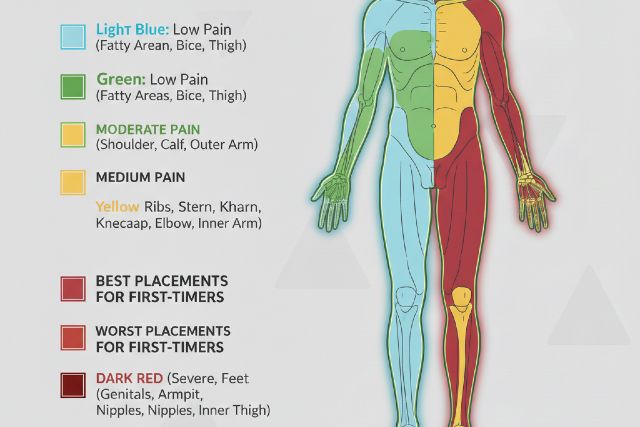
Most tattoo pain charts place outer, fleshy regions at the low end and bony, nerve-dense regions at the high end. This pattern is consistent across major tattoo and health references that discuss placement pain.

Low pain areas are commonly the outer upper arm, outer forearm, upper outer thigh, and parts of the calf. Moderate pain areas often include the shoulder, upper back, hip, and some sections of the lower leg away from the shin. High pain areas frequently include ribs, sternum, spine, hands and fingers, feet and ankles, armpit, inner arm, and the inner elbow area.

Best Tattoo Placements for First-Timers

Outer Upper Arm (Deltoid)

If you want a classic “first tattoo” location, the outer upper arm is a top contender. The tissue is usually padded enough to keep pain in a manageable range, and artists can position you comfortably. Healing is also straightforward because you can keep the area clean and protected without constant rubbing.

This is also a strong choice if you’re unsure how your body reacts, because you can start with a smaller design and expand into a sleeve later without the first tattoo feeling like a disconnected decision.

Outer Forearm

Outer forearm tattoos often feel moderate and predictable. Many first-timers describe the sensation as scratchy rather than sharp. It’s also easy to show off or cover up, depending on your workplace and personal preferences.

Pain can increase as you move toward the wrist, where the skin becomes thinner and the anatomy more bony. If you’re sensitive, placing the design slightly higher can make the experience noticeably easier.

Upper Outer Thigh

For many people, the upper outer thigh is one of the most comfortable places to get tattooed. The extra padding can reduce the sting, especially during shading. It’s also an area that tends to age well because it’s not constantly exposed to sun and friction compared to hands or feet.

If you wear tight jeans or do a lot of running, plan your aftercare carefully to minimize rubbing during the first week.

Calf (Outer)

The outer calf often sits in the “easier than you expected” category. It’s usually less brutal than shin, ankle, or foot placements, and the skin is workable for both fine-line and bolder styles. Longer sessions can still wear you down, but it’s commonly manageable for first-timers.

Worst Tattoo Placements for First-Timers

Ribs and Ribcage

Rib tattoos are frequently rated among the most painful. The skin is thin, the bone is close, and the area moves constantly with breathing. Even people with high pain tolerance often describe ribs as intense, especially if the design involves heavy shading or multiple passes.

If you love a rib design but want a smoother first experience, consider placing the first version on the outer upper arm or thigh, then returning to ribs later once you know your tolerance.

Feet and Ankles

Feet and ankles combine thin skin, bone proximity, and dense nerves. Pain can spike quickly, even for small tattoos, and swelling during healing can be more noticeable if you’re standing or walking a lot. These placements are also more exposed to friction from socks and shoes, which can complicate healing.

Armpit

The armpit is widely considered one of the most painful placements. The tissue is sensitive, nerve-rich, and challenging to sit through. Many guides list it near the top of the pain scale and strongly recommend skipping it as a first tattoo.

Hands and Fingers

Hands and fingers can hurt, but pain isn’t the only issue. These areas often fade faster because of frequent washing, friction, and skin turnover. Some artists are cautious about hand and finger tattoos for first-timers because they may require more touch-ups and can age differently than forearm or upper arm work.

Sternum and Center Chest

The sternum is a high-intensity placement for many people. The needle is working close to bone, and the area can feel sharp and draining, especially in longer sessions with shading.

Pain Isn’t the Only Factor: Healing and Lifestyle Matter

A tattoo pain chart helps you anticipate the session, but your day-to-day life affects healing just as much.

If you work a physical job, high-friction placements such as hands, inner elbow, or feet may be annoying to heal. If you sit at a desk, waistline, ribs, or areas that rub against chair arms can become uncomfortable. If you train hard at the gym, avoid placements that stretch constantly, such as inner elbow or behind the knee, unless you can modify workouts during the first couple of weeks.

From a medical perspective, tattoos are essentially controlled skin trauma. Cleveland Clinic emphasizes that careful aftercare reduces the risk of complications like infection, rash, scarring, and tattoo distortion.

What Tattoo Pain Feels Like: Realistic First-Timer Expectations

Many people are surprised that tattooing isn’t one single feeling. Outlines often feel sharper and more scratch-like, while shading can feel hotter or more raw because the needle revisits the same area repeatedly.

A small fine-line tattoo on the outer upper arm often feels persistently scratchy, and most people can chat through it. A rib tattoo with shading tends to feel intense and breath-sensitive, and it can become mentally tiring over time. An ankle tattoo may start off sharp and stay sharp, but it can still be doable if the session is short.

If you’re nervous, your best advantage is choosing a placement with a predictable, moderate sensation and keeping the first session relatively short.

How to Reduce Tattoo Pain Safely

The biggest “pain reducers” are not hacks. They’re basics that prevent your nervous system from being on high alert.

Arrive well-rested and fed, because low sleep and low blood sugar make sensations feel louder. Avoid alcohol beforehand, since it can increase bleeding and complicate the session. Hydrate normally and avoid excessive caffeine if it makes you anxious.

During the tattoo, focus on steady breathing and relaxing the muscles near the tattoo site. Tensing increases discomfort and can make the session feel longer than it is. Ask for short breaks before you hit your limit rather than waiting until you’re overwhelmed.

If you’re considering numbing cream, discuss it with your artist in advance. Some artists prefer not to use it because it can slightly affect skin texture and how ink settles, depending on the product and timing. Follow professional advice and use reputable products if you go that route.

Tattoo Style and Session Length Change Pain More Than People Expect

Placement is huge, but style and time matter.

A small, minimal linework tattoo can be a completely different experience than a large, saturated piece in the same location. Dense shading and color packing often involve repeated passes and can become more intense as the skin gets irritated. Even “easy” areas can feel tough in hour three or four.

If your goal is the smoothest first tattoo, consider a design that can be completed in one shorter session and avoid extremely sensitive placements.

Pain vs. Warning Signs: What’s Normal and What Isn’t

Some soreness, warmth, and mild swelling are common after a tattoo, especially in the first day or two. A review of tattoo-related complications notes that mild discomfort is expected, but infections and inflammatory reactions can occur in a smaller subset of cases.

If you notice worsening redness that spreads, increasing heat, pus, fever, or red streaking, treat it as a medical concern rather than “normal healing.” When in doubt, get clinical guidance.

FAQ: Tattoo Pain Chart Questions People Ask Most

What is a tattoo pain chart?

A tattoo pain chart is a guide that estimates how painful tattooing may be on different body parts based on factors like skin thickness, fat or muscle padding, nerve density, and proximity to bone.

What is the least painful place to get a first tattoo?

Many first-timers find the outer upper arm, outer forearm, upper outer thigh, and outer calf among the most manageable placements because they’re typically fleshier and less nerve-dense than bony zones.

What is the most painful place to get a tattoo?

Ribs, armpit, feet and ankles, sternum, hands and fingers, inner arm, and inner elbow are frequently rated among the most painful because they combine sensitive tissue, thin skin, and bone proximity.

Do tattoos hurt more if you’re anxious?

They can. Anxiety increases tension and can heighten pain perception, which is why breathing, breaks, and choosing a lower-pain placement can significantly improve the first experience.

Is tattoo removal more painful than getting a tattoo?

Many people report removal can feel more intense than getting tattooed and often requires multiple sessions.

Conclusion

A tattoo pain chart is most useful when you treat it as a realistic guide, not a guarantee. For first-timers, choosing a placement like the outer upper arm, outer forearm, upper outer thigh, or outer calf often leads to a smoother session and easier healing. High-pain placements like ribs, feet, hands, armpit, sternum, and inner elbow can absolutely be worth it, but they’re usually better as a second or third tattoo once you understand your tolerance. If you use the tattoo pain chart to pick a sensible starting spot, prepare well, and follow dermatologist-backed aftercare, you’ll improve both comfort and the final result.


Temperature Gauge Reading Low: Causes, Symptoms, and Quick Solutions

0

If your temperature gauge is reading low, it’s usually telling you one of two things: the engine is genuinely running cooler than designed, or the dashboard reading is wrong because a sensor, wiring, or the gauge itself is misreporting. Either way, it’s worth paying attention, because engines are engineered to operate in a fairly specific temperature range for efficiency, cabin heat, and emissions control.

Most drivers notice this problem when the needle stays close to “C,” never reaches the usual midpoint, or drops lower during highway driving. You might also notice weaker heater output, lower fuel economy, or a check-engine light. The good news is that the most common causes are fixable, and many can be narrowed down with a few simple checks.

What “Normal” Engine Temperature Looks Like

While every vehicle is a bit different, many gasoline engines are designed to stabilize roughly around the thermostat’s regulating temperature, commonly in the neighborhood of about 195°F to 220°F (90°C to 104°C) once fully warmed up.

That matters because when an engine stays too cool, the control system may keep the mixture richer for longer, and the catalytic converter may take longer to reach peak effectiveness. Cold operation is widely linked to higher fuel use and higher emissions during warm-up compared with fully warm running.

Definition: Temperature Gauge Reading Low

A “temperature gauge reading low” condition means the dash gauge stays below its normal warmed-up position after typical driving time, or it fluctuates downward (often at speed) instead of settling into a stable, normal range.

Temperature Gauge Reading Low: The Most Common Causes

Thermostat stuck open (most common real cause)

A thermostat is designed to stay closed when the engine is cold so the coolant doesn’t circulate through the radiator too soon. If it sticks open, coolant flows all the time, heat is constantly shed through the radiator, and the engine can struggle to reach proper operating temperature, especially in cool weather or at highway speeds.

A very common companion sign is weak cabin heat because the heater core never gets as hot as it should. Many cars may also set a “coolant temperature below regulating temperature” type fault code, often referenced in diagnostics as P0128 on many models (code naming varies by manufacturer).

Engine coolant temperature sensor (ECT) reading incorrectly

The coolant temperature sensor tells the ECU what the engine temperature is, and in many designs it also influences what the gauge shows. If it reads colder than reality, the gauge may stay low and the ECU may behave like the engine is still warming up, which can affect fueling, idle behavior, fan control, and emissions strategy.

Because sensor issues can mimic thermostat symptoms, the fastest way to separate them is comparing the dash gauge to live coolant temperature data from an OBD2 scan tool.

Wiring or connector problems, or an instrument cluster issue

Sometimes the sensor is fine but the signal is not. Corrosion in the connector, damaged wiring, or a failing instrument cluster can create an inaccurate low reading.

A clue here is inconsistency. If the gauge jumps, dips suddenly, or changes when you hit bumps, that’s often electrical rather than an actual temperature change.

Cooling fan running too much

If the radiator fan is commanded on when it shouldn’t be, it can over-cool the radiator and keep the system colder than expected. This is more noticeable at idle or in mild weather, and it can also be a downstream effect of a bad sensor signal.

Air pockets after coolant work

If the cooling system has recently been drained and refilled, trapped air can sometimes cause odd readings and inconsistent heat. This can show up as a heater that alternates between warm and cool, or a gauge that doesn’t behave like it did before service.

Symptoms That Often Show Up With a Low Reading

A low reading on the temperature gauge becomes much more meaningful when it comes with other symptoms.

Weak or lukewarm cabin heat is one of the strongest “thermostat stuck open” signals, especially if it never gets properly hot on the highway.

Fuel economy often drops when the engine runs cold longer than it should. Research into cold operation and cold-start effects consistently shows increased fuel consumption and higher emissions before the powertrain and catalyst warm up.

A check-engine light may appear. Many vehicles monitor how quickly coolant temperature rises and whether it reaches the expected regulating range. When that expectation isn’t met, a fault is stored and the MIL may illuminate.

Gauge behavior that improves in stop-and-go traffic but drops on the highway is classic for over-cooling. Airflow through the radiator at speed removes heat so efficiently that an always-open thermostat can’t maintain the setpoint.

Quick Solutions and Checks You Can Do

Start by observing warm-up time and heater output. On a typical day, most cars should move off the cold mark within a few minutes of driving, and cabin heat should become noticeably warm as the engine approaches operating temperature. If you can drive 15 to 20 minutes and it still feels like the engine never “gets there,” a thermostat stuck open becomes very likely.

Next, check the coolant level only when the engine is completely cold. Low coolant more often leads to overheating, but low levels or air pockets can create strange sensor behavior and poor heater performance.

Pay attention to whether the gauge drops mostly at speed. A gauge that climbs a little in city driving but drops on the highway strongly suggests over-cooling rather than a gauge-only problem.

If the only symptom is a low gauge but the heater is strong and stable, that’s when you start suspecting the gauge circuit, sensor bias, or cluster rather than the engine actually running cold.

The Fastest Diagnostic Shortcut: Compare Gauge vs Live Data

If you have access to any OBD2 scanner that can show live data, read the coolant temperature value and compare it to what the dash gauge suggests.

If live coolant temperature shows normal warmed values but the dash still reads low, you’re chasing a dash/gauge/cluster/wiring issue more than a thermostat.

If live coolant temperature stays unusually low while driving, especially on the highway, the thermostat is the prime suspect.

This single comparison often prevents replacing parts blindly.

Repair Options and What They Usually Fix

A thermostat replacement is the most common fix when the engine truly runs too cool. After replacement, you typically see normal warm-up time, stable gauge behavior, and noticeably better cabin heat.

A coolant temperature sensor replacement can fix a falsely low reading and also restore correct ECU decisions. This is most appropriate when live data is erratic, implausible, or doesn’t match the engine’s real behavior.

Electrical repairs apply when the sensor reading is sensible in live data but the dash gauge is wrong. That can include cleaning connectors, repairing wiring, or repairing/replacing the cluster depending on the design.

If the cooling fan is running constantly, diagnosing relay control, fan module behavior, and temperature inputs can resolve the over-cooling.

Why You Shouldn’t Ignore It

Even if the car seems “fine,” chronic cold operation can cost you over time. Engines tend to consume more fuel while warming up and may produce higher emissions until everything reaches optimal operating temperature. Studies of cold-start and cold-operation behavior highlight how strongly temperature affects both fuel economy and emissions output in that phase.

In colder climates, pre-heating strategies like block heaters are commonly cited for reducing warm-up losses and improving comfort, underscoring the real efficiency penalty of cold running.

When to Get a Mechanic Involved

If your gauge fluctuates unpredictably, if you have repeated warning lights, if coolant level keeps dropping, or if you’ve already replaced a thermostat or sensor and the issue remains, a professional cooling-system diagnostic is worth it. A shop can pressure-test for leaks, verify thermostat operation, and confirm sensor signal integrity.

FAQ

Why is my temperature gauge staying low?

The most common reason is a thermostat stuck open, which over-cools the engine by allowing continuous coolant flow through the radiator. Sensor or wiring issues can also cause a falsely low reading.

Can I drive with the temperature gauge reading low?

You can usually drive short-term, but it’s not ideal. Running cold can reduce fuel economy and increase emissions during extended warm-up and cold operation.

Why does my temperature gauge drop on the highway?

Higher airflow across the radiator removes heat more efficiently. If the thermostat is stuck open, the cooling system can’t regulate temperature properly at speed, so the gauge drops.

What if my heater is hot but the gauge reads low?

That often points to a gauge, wiring, or sensor reporting problem rather than an engine that’s truly cold. Confirm by comparing live coolant temperature data to the dash reading.

Conclusion

When your temperature gauge reads low, the most likely causes are a thermostat stuck open, a coolant temperature sensor issue, or an electrical/gauge problem. The quickest path to clarity is matching real coolant temperature from live OBD2 data to what the gauge shows. Fixing the root cause restores proper operating temperature, improves cabin heat, and helps avoid the fuel and emissions penalties linked to cold operation.

Rtasks Strategy: Turn Big Goals Into Simple Daily Actions

0

If you’ve ever set a big goal, like getting fit, launching a side project, or learning a new skill, and then watched your motivation fade after the first burst of excitement, you’re not alone. The Rtasks strategy is a practical way to translate big outcomes into small daily actions that actually happen in real life. Instead of depending on willpower, Rtasks helps you build a steady rhythm through clarity, consistency, and a simple plan for what you do today.

This matters because wanting something and executing it are different skills. Research on implementation intentions, the “if-then” planning method, shows a meaningful positive impact on goal attainment, largely because the plan makes action more automatic when the moment arrives.

What is the Rtasks strategy?

Rtasks is a goal-execution approach that converts a big objective into a small daily action you can repeat consistently. The daily action is designed to be extremely clear, realistic even on busy days, and easy to review so you can adjust without starting over.

At its core, Rtasks is not about writing prettier goals. It’s about building a daily system that runs even when motivation is low. When you treat progress as a repeatable behavior rather than a heroic effort, you don’t have to “get inspired” to move forward. You just follow the plan.

Rtasks definition for quick answers

Rtasks is a strategy for turning big goals into simple daily actions by choosing the smallest meaningful step, attaching it to a reliable cue, and reviewing progress weekly so consistency compounds into results.

Why big goals fail and daily actions succeed

Big goals often fail because they are vague at the moment when you need to act. “I’ll work out more” or “I’ll grow my business” may sound motivating, but they don’t tell your brain what to do at 7:30 p.m. on a stressful Tuesday. That’s where implementation intentions help. When you decide in advance what action you’ll take in a specific situation, you reduce the need to negotiate with yourself in the moment. Meta-analytic evidence shows implementation intentions improve goal attainment, suggesting that specificity and situational cues matter more than hype.

Another reason big goals fail is that habits take longer than people assume. Research from University College London found that habit automaticity took about 66 days on average, with wide variation depending on the person and the behavior. That timeline changes how you plan. If habits aren’t “locked in” after a week or two, then a strategy that relies on short bursts of motivation is fragile. Rtasks is built for the long game.

Big goals also trigger all-or-nothing thinking. When the only “acceptable” version of progress is a perfect workout, a perfect study session, or a perfect work sprint, missed days feel like failure and lead to quitting. Goal-setting research finds that specific, challenging goals generally outperform vague “do your best” goals, partly because they focus attention and effort. But challenging outcomes still need manageable daily inputs, and Rtasks provides that bridge.

How to use Rtasks to turn big goals into simple daily actions

Start with a measurable finish line

Rtasks begins with clarity about what you want. Your goal should have a finish line you can recognize. “Get healthier” is hard to execute because it can mean anything. “Walk 30 minutes, five days a week for ten weeks” is clear enough to plan around. The point is not to be rigid. The point is to remove ambiguity so you can design the daily action that leads there.

Choose your minimum viable daily Rtask

Your daily Rtask should be small enough that you can do it when you’re busy, tired, stressed, or low on motivation. A useful test is whether you can complete it in two to ten minutes. If the answer is no, you probably designed a weekly project, not a daily action.

This idea aligns with behavior design principles often summarized as making behaviors easier to start. BJ Fogg’s behavior model emphasizes simplicity and reducing friction so actions happen more reliably. Rtasks uses the same logic. Start small, earn consistency, then expand.

Attach the Rtask to a reliable cue

The most overlooked part of follow-through is deciding when the action will happen. If the plan is “I’ll do it later,” later becomes never. Rtasks solves this by anchoring your daily action to a stable part of your routine.

An anchor could be brushing your teeth, finishing lunch, opening your laptop, or getting home from work. You then create a simple if-then plan. If it’s after lunch, then I do my Rtask. If I open my laptop at 9 a.m., then I write 100 words. This is exactly the structure used in implementation intentions, and it’s one reason the approach is so effective.

Define success as completion, not intensity

Rtasks is built around completion. If the task is done, you win. This prevents perfectionism from hijacking progress. A short walk still counts. A messy draft still counts. Ten minutes of practice still counts.

This isn’t about lowering standards. It’s about building reliability. Once the behavior is consistent, you can increase intensity without risking collapse.

Track it in the simplest way you will actually maintain

Tracking is not about creating a complicated dashboard. It’s about making progress visible. Visibility reinforces consistency because it reminds you that you’re the kind of person who follows through.

Review weekly and refine without restarting

Rtasks includes a weekly review so your plan stays realistic. The goal of the review is not to judge yourself. It’s to adjust the system.

During your weekly check-in, look for patterns. If you keep missing the task on certain days, the anchor might be wrong. If the task feels heavy, it might be too large. If you are completing it easily, you may be ready to increase the task slightly. Over time, you “raise the floor” by keeping the minimum consistent and gradually expanding what “done” includes.

Rtasks in action: a realistic scenario

Imagine someone whose big goal is to launch a freelance design business. The outcome is to replace part-time income within three months. The common failure mode is working intensely on weekends, doing almost nothing during the week, then feeling behind and overwhelmed.

Rtasks changes the plan into a daily system. The minimum daily Rtask becomes either sending one outreach message or improving the portfolio for ten minutes. The anchor is opening email at 10 a.m. or the first work block after lunch. Tracking is a simple daily mark. The weekly review checks what’s getting in the way, and adjusts accordingly. If outreach feels intimidating, the weekly review focuses on improving one message template. If the portfolio feels unclear, the weekly review focuses on adding one case-study paragraph.

After four weeks, the person has created consistent opportunities for feedback. There are conversations started, portfolio iterations built, and a growing sense of competence because the task is now familiar. That’s what makes Rtasks powerful. It creates steady action that produces data, and data produces better decisions.

Common Rtasks mistakes and how to fix them

One common mistake is choosing a daily task that is still too big. If you’re skipping days, it’s a signal that the action is not “minimum viable” for your current life. The fix is not to push harder. The fix is to shrink the task until it becomes nearly effortless to start, then rebuild from consistency.

Another common mistake is relying on motivation instead of cues. If your plan requires you to feel inspired, you will be inconsistent. Motivation is a wave. Systems are stable. The fix is to attach the Rtask to a cue you already perform reliably.

A third mistake is measuring outcomes daily instead of inputs. If you obsess over the scale every day, the revenue every day, or the end result every day, you’ll feel emotional volatility that can sabotage the habit. Rtasks emphasizes daily inputs and weekly outcome review. You still care about results, but you don’t let short-term noise control your behavior.

How to optimize Rtasks for different goal types

For fitness goals, the best Rtask is usually a tiny movement behavior anchored to an existing routine. Walking after dinner, stretching after brushing teeth, or doing a short routine after you put on workout clothes are examples that reduce friction. When consistency is strong, you can increase time or intensity.

For learning goals, the best Rtask is usually a small practice loop rather than passive reading. One problem, one flashcard set, or one short summary can be more effective than long sessions that you avoid. If you’re studying for an exam, your weekly review can shift the Rtask toward weak areas.

For creative goals like writing, design, or content creation, the best Rtask is often output-focused rather than “research-focused.” A daily minimum word count, a single sketch, or one small deliverable prevents the endless preparation loop. The weekly review then decides what to expand.

For business goals, the best Rtask is usually a single revenue-adjacent action. One outreach message, one follow-up, one proposal revision, or one offer improvement keeps the pipeline moving. Daily business Rtasks build compounding advantage because they stack relationships and iterations.

FAQ

What does Rtasks mean?

Rtasks means turning a big goal into a repeatable daily task that is clear, realistic, and anchored to a routine so you can execute consistently and review progress weekly.

How many Rtasks should I do per day?

Start with one Rtask per day until it feels stable and automatic. Habit research suggests automaticity can take about 66 days on average, so stacking too many tasks too early often creates friction and drop-off.

Why do if-then plans help with consistency?

If-then plans reduce decision-making in the moment by linking an action to a situation. Evidence from research on implementation intentions shows they improve goal attainment because the cue triggers action more reliably than motivation does.

Can Rtasks work for long-term goals like career changes?

Yes. Rtasks is especially effective for long-term goals because it converts “someday” into “today,” then uses weekly reviews to keep the plan realistic as your life changes.

What if I miss a day?

Missing a day is feedback, not failure. The correct response is to adjust the system. Make the task smaller, improve the anchor, and restart the next day. Consistency over time matters more than perfection.

Conclusion

Big goals are exciting, but they aren’t executable on their own. Execution lives in your routines and in the small decisions you make daily. The Rtasks strategy works because it converts ambition into a simple daily action you can repeat, anchors that action to a real-life cue, and adds weekly review so you adapt without starting over. When you use Rtasks, you stop waiting for motivation and start building momentum.

If you want to begin today, choose one goal, design one minimum daily Rtask, attach it to a reliable moment, and mark it done. Then repeat. Over time, those small daily actions become your system, and your system becomes your results.

GM Tech 2 Scanner: Is It Worth Buying Today? Honest Pros & Cons

0

If you’re shopping for a GM Tech 2 Scanner, you’re probably trying to answer one question: is this “classic dealership tool” still a smart buy in 2026, or should you put that money into newer GM workflows like MDI2 plus GDS2 and Techline Connect? The honest answer is that the GM Tech 2 Scanner can still be absolutely worth it, but only when it matches the kind of GM vehicles you actually work on. On the right model years, it still feels faster and deeper than many modern tablet scanners. On newer vehicles, it’s no longer the center of GM’s diagnostic universe.

This guide breaks down what the GM Tech 2 Scanner still does extremely well, where it falls behind, and who should buy it today.

What is the GM Tech 2 Scanner?

The GM Tech 2 Scanner is an OEM-style diagnostic platform that became the standard in many GM dealership service departments for years. Its reputation comes from what it can do beyond reading codes. It provides deep access to GM modules, supports special functions, and allows bi-directional controls that let you command components and run system tests in ways many generic scan tools still struggle to match.

A major part of keeping a Tech 2 relevant is the CANdi module. OTC’s Tech 2 CANdi User’s Guide describes CANdi as an in-cable module that works with existing Tech 2 components and is backward compatible, essentially expanding what the setup can communicate with while keeping older functionality intact.

GM Tech 2 Scanner vehicle coverage: what years does it really make sense for?

This is where buyers either feel like they got a bargain or feel like they bought the wrong tool.

GM’s own diagnostic support materials make the split clear. ACDelco’s Diagnostic Support and Resources page explains that model year 2010 and newer GM vehicles require GDS2 running on a computer with MDI2 connected to the vehicle, and that earlier vehicles vary between Tech2Win and GDS2.

ACDelco also publishes a “GDS2 scan tool-supported vehicles” sheet that states all 2007 and prior model years have no GDS2 support and are supported by Tech2/Tech2Win, while all 2014 and future model years are supported by GDS2. The sheet also outlines that 2008–2013 are transitional, with many vehicles still supported by Tech2/Tech2Win while some are GDS2-supported, and it even calls out exceptions like certain Captiva Sport years.

A practical way to think about it is that the GM Tech 2 Scanner is strongest where Tech2/Tech2Win is the intended GM workflow. Once you’re primarily in the GDS2 era, Tech 2 becomes less of a main tool and more of a niche tool.

GM Tech 2 Scanner: is it worth buying today?

It is worth buying today if you frequently work on GM vehicles where Tech2/Tech2Win is the intended diagnostic path, especially 2007 and older, and many vehicles in the transitional 2008–2013 range depending on the model. That’s straight from GM’s own GDS2-supported vehicle guidance, which explicitly positions Tech2/Tech2Win for 2007 and older and indicates broad GDS2 support from 2014 onward.

It is much less worth buying today if you expect it to be your primary tool for 2014+ GM vehicles, because GM’s published resources point you toward GDS2 with MDI2 for those years.

The key is not whether the Tech 2 can “connect” in some situations. The key is whether the Tech 2 is aligned with the workflow GM expects for that vehicle generation, including software and support.

Pros of the GM Tech 2 Scanner

OEM-style depth on the right vehicles

When the Tech 2 matches the platform, it can feel like you’re navigating the vehicle the way the engineers intended. The menus are system-specific, and the tool tends to surface relearns, setup procedures, and special tests in a direct way.

If you’re diagnosing older GM systems, that OEM structure can cut your diagnostic time because you’re not fighting generic menu trees or missing module coverage.

Special functions and bi-directional controls that solve real jobs

Many “code readers” can tell you what’s wrong. Fewer tools can help you prove it quickly by commanding components, running routines, and verifying results. That’s where the GM Tech 2 Scanner built its reputation.

The most practical value is when you need functional tests and routines that mimic factory procedures, such as calibration tasks or automated tests, depending on the vehicle and system. This is also why many technicians still want the Tech 2 experience in Tech2Win form for supported vehicles.

CANdi module keeps the Tech 2 relevant in a wider range

If you’re buying a Tech 2 today, you should understand CANdi before you spend money.

OTC’s Tech 2 CANdi User’s Guide explains that CANdi is designed to work with existing Tech 2 components, is fully backward compatible, and is meant to be transparent unless a CANdi-specific feature is enabled. In real terms, CANdi is what makes many Tech 2 setups usable across a broader set of networked GM vehicles in the Tech 2 era.

Cons of the GM Tech 2 Scanner

It is not GM’s main path for newer diagnostics

GM’s own guidance makes it clear that modern diagnostics for 2010+ increasingly live in GDS2 on a computer with MDI2 connected to the vehicle, and that 2014+ is fully in the GDS2-supported world.

If you’re a shop that mostly sees newer GM vehicles, a Tech 2 purchase can feel like buying a specialty wrench when you really needed a full toolbox.

Programming expectations are where many buyers get disappointed

A lot of people buy a GM Tech 2 Scanner expecting it to handle programming like “plug in and flash a module.” Modern GM programming and service functions depend on the broader software ecosystem, subscriptions, and a stable pass-thru workflow.

ACDelco TDS is a key hub for GM diagnostic software subscriptions, listing options like GDS2 plus Tech2Win and Tech2Win standalone subscriptions with pricing and terms shown directly on the site.

That matters because it reflects where GM’s diagnostic world has gone. Even if the Tech 2 is excellent at diagnostics, programming and late-model support tend to pull you toward the computer-based toolchain.

The market is crowded with clones and inconsistent quality

One of the biggest risks today isn’t whether the Tech 2 concept works, it’s whether the unit you’re buying is reliable and supported. Many online listings are not genuine OEM units, and quality can vary. This becomes especially important if you’re depending on the tool daily.

Even when a clone “works,” long-term durability, connector quality, and firmware/software legitimacy become practical risks you should price in.

GM Tech 2 Scanner vs Tech2Win vs MDI2 + GDS2: how to choose

The cleanest way to choose is to match the tool to the GM generation you service most.

If your work is heavily 2007 and older GM, the GM Tech 2 Scanner or Tech2Win-style workflow is strongly aligned with GM’s published support guidance for those years.

If your work is heavily 2014 and newer GM, GM’s own documentation points you toward GDS2 support, typically paired with MDI2.

If your shop sees a true mix, many technicians end up with a two-lane setup: Tech 2 for legacy speed and familiar OEM workflows, and MDI2 plus GDS2 for modern coverage. That combination reduces friction because you’re not trying to force one tool to do everything across two very different diagnostic eras.

Buying tips for the GM Tech 2 Scanner in 2026

Decide whether you are buying for coverage or for speed on a specific era

A Tech 2 purchase makes the most sense when you want the best experience on vehicles it was designed for. If your goal is “one device for every GM from 1999 to 2026,” you will probably end up disappointed, because GM itself draws a line between Tech2/Tech2Win-era workflows and GDS2-era workflows.

Treat CANdi as part of the package, not an optional accessory

If you’re serious about using the GM Tech 2 Scanner across the networked vehicles in its era, CANdi is often what turns the tool from “sometimes useful” into “consistently useful.”

OTC’s guide emphasizes CANdi’s integration with existing Tech 2 components and backward compatibility, which is exactly why it is so commonly recommended as part of a complete setup.

Budget for the software ecosystem if you expect modern workflows

If you expect to do modern diagnostics and programming, build your budget around software subscriptions and supported toolchains, not just hardware.

ACDelco TDS lists subscription offerings for GDS2 and Tech2Win, which gives you a realistic picture of ongoing costs if you want to stay inside the official GM ecosystem.

FAQ

Is the GM Tech 2 Scanner still useful in 2026?

Yes, it can be very useful when you’re working in the Tech2/Tech2Win-supported years, especially 2007 and older and many vehicles in the 2008–2013 transition range depending on model. GM’s own supported-vehicles sheet and diagnostic resources show this split and position GDS2 for 2014+ vehicles.

Do I need the CANdi module with a GM Tech 2 Scanner?

If you plan to diagnose CAN-equipped GM vehicles in the Tech 2 era, CANdi is often essential. OTC’s Tech 2 CANdi User’s Guide explains that CANdi is an in-cable module designed to work with existing Tech 2 components and remain backward compatible, which is why it’s widely treated as part of a complete setup.

What should I buy instead if I mainly work on newer GM vehicles?

If your work is mostly 2014+ GM, GM’s guidance points to GDS2-supported diagnostics, typically using MDI2 connected to the vehicle while GDS2 runs on a computer.

Can I get the Tech 2 experience without buying the handheld unit?

Tech2Win is designed to emulate the Tech 2 on a PC, and ACDelco TDS sells Tech2Win subscriptions as well as bundles that include GDS2 plus Tech2Win.

Conclusion: GM Tech 2 Scanner — worth it or not?

The GM Tech 2 Scanner is still worth buying today when you’re servicing the GM years and models where Tech2/Tech2Win is the intended diagnostic approach, especially 2007 and older and many vehicles in the transition years depending on platform. GM’s own GDS2-supported vehicle guidance reinforces that Tech2/Tech2Win remains the support path for 2007 and prior, while GDS2 is the supported path for 2014 and future vehicles.

If you mainly service newer GM vehicles, the Tech 2 should not be your main investment. The more future-proof route is aligning with GM’s modern workflow, which GM’s own diagnostic resources position around GDS2 running on a computer with MDI2 connected to the vehicle.

Arm Banding for Men: How to Do It Safely and Effectively

0

Arm banding is one of those training methods that sounds risky until you understand what it is and how to apply it correctly. In fitness, arm banding usually refers to wrapping a cuff or elastic band high on the upper arm to create partial blood flow restriction during exercise. Done correctly, arm banding can help men stimulate arm growth using lighter weights, which is useful for reducing joint stress, training around minor aches, or adding high-quality volume when heavy lifting is not ideal. Done incorrectly, it can lead to numbness, excessive discomfort, bruising, or other avoidable issues.

This article explains what arm banding is, why it works, what the science says, and how to do it safely and effectively with practical programming examples and clear answers to common questions.

What Is Arm Banding?

Arm banding is a training technique in which a band or cuff is placed near the top of the arm to partially restrict blood flow during exercise. The method is closely associated with blood flow restriction training, often shortened to BFR. The idea is to reduce venous return, meaning blood leaving the arm, while still allowing some arterial inflow. This creates a high-metabolic-stress environment that makes light weights feel much harder, which can trigger muscle-building signals even when the load is relatively low. Research-based guidance on BFR highlights the importance of cuff placement, individualized pressure, and sensible session design.

One important clarification is that “arm banding” can also be used in medical or cosmetic contexts to describe tissue bands after weight loss or surgery. If you are searching because of skin banding or visible tissue changes rather than training, you should use medical guidance instead of fitness advice.

Why Arm Banding Works for Men

Most men think bigger arms require heavier weights. Heavy training can work extremely well, but it also raises the cost in terms of joint stress and recovery, especially if you are adding extra arm volume on top of pressing and pulling work. Arm banding is popular because it can create a strong hypertrophy stimulus with loads that are much lighter than traditional strength training.

Studies and reviews commonly report that low-load BFR training can produce meaningful gains in muscle size, and in many cases results can be comparable to traditional high-load training when protocols are properly structured. This does not automatically mean it is better than heavy lifting. It means it is a valuable tool that can complement your training, especially if you need a joint-friendlier way to add arm stimulus.

Is Arm Banding Safe?

Arm banding can be safe when it is performed with appropriate pressure, correct placement, reasonable durations, and basic screening for risk factors. Modern guidance strongly emphasizes individualized pressure where possible, because the same “tightness” can mean very different levels of restriction depending on your arm size, the width of the cuff, and the material used.

Safety discussions in the literature and clinical guidance often focus on avoiding excessive pressure, limiting continuous restriction time, and paying attention to symptoms that indicate you should stop. A risk-focused review discussing BFRT applications highlights the importance of good protocols and medical considerations, especially when people have health factors that raise risk.

This information is educational, not medical advice. If you have cardiovascular disease, uncontrolled high blood pressure, a history of blood clots, vascular disease, or unexplained neurological symptoms, speak to a qualified clinician before using BFR methods.

Who Should Avoid Arm Banding or Get Cleared First

Clinical and rehab-oriented guidelines commonly recommend avoiding BFR or getting clearance first if you have a history of blood clots, known clotting disorders, uncontrolled hypertension, significant cardiovascular disease, peripheral vascular disease, pregnancy, active infection, open wounds near the cuff site, unexplained swelling, or ongoing numbness and nerve issues. These categories are repeatedly emphasized in clinic screening guidance for BFR.

Even if you feel healthy, it is still wise to be conservative with pressure and duration until you know how your body responds.

How to Do Arm Banding Safely and Effectively

Correct equipment matters more than most people think

The safest option is a purpose-built BFR cuff, especially pneumatic cuffs that can control pressure more reliably. Research-informed recommendations favor approaches that consider limb occlusion pressure rather than guessing tightness by feel. If you use improvised wraps, it becomes easier to over-tighten without realizing it, which is where many problems start.

Placement should be high on the upper arm

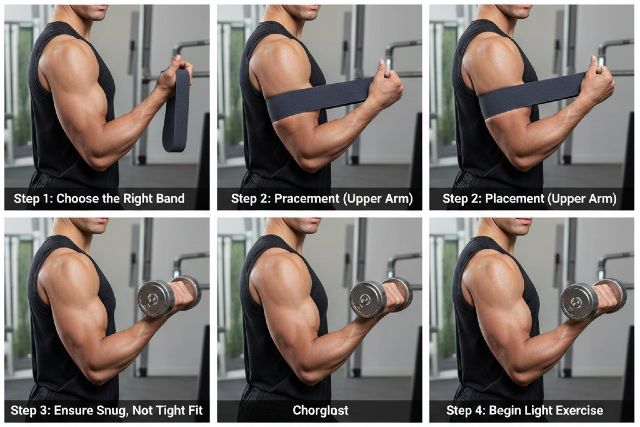
For arm banding, place the cuff as high as comfortably possible on the upper arm, close to the shoulder. Avoid placing it near the elbow or on the forearm. Proximal placement is standard in BFR guidance and helps reduce unnecessary pressure around joints and sensitive structures.

Pressure should be individualized when possible

The most evidence-based approach is to set pressure relative to your limb occlusion pressure, often called LOP, which is the amount of pressure required to stop arterial flow. Many protocols use a percentage of LOP, and upper-limb pressures are typically set lower than lower-limb pressures because arms occlude more easily. Educational and clinic resources frequently discuss upper-limb ranges around roughly 40 to 50 percent of LOP in common setups, adjusted to the individual.

If you do not have a way to measure LOP, keep tightness moderate and prioritize normal sensation in the hand and fingers. Your arm should not turn pale or cold, and you should not feel tingling or numbness developing during the set. If numbness starts, stop and deflate immediately.

Duration should be controlled and breaks should be built in

A common best practice is to keep restriction on during a short block of sets and then deflate between exercises. Staying restricted continuously for long periods is not smart. Many clinic guidelines emphasize managing work-to-rest patterns and using deflation to reduce risk and discomfort.

Loads should be light and execution should be strict

Arm banding is designed for low-load training, not for proving you are tough. Low loads with controlled reps, short rests, and good form are what create the intended stimulus. Reviews and practical guidance discuss low-load BFR as an effective method for hypertrophy and strength adaptations when heavier loading is not feasible or desirable.

Training Examples for Arm Banding

The simplest way to use arm banding is as a focused arm-growth block at the end of an upper-body session. This keeps your primary training normal while adding a targeted hypertrophy stimulus with lighter weights.

A biceps-focused approach works well with a curl variation like dumbbell curls, cable curls, or machine curls. You choose a weight that feels easy at first but becomes challenging as fatigue accumulates. The goal is a deep muscular burn without loss of hand sensation.

A triceps-focused approach can use pushdowns or overhead cable extensions with strict form. If your elbows are sensitive, pushdowns often feel more manageable than heavy skull crushers.

A combined approach alternates one biceps movement and one triceps movement so you get a balanced pump without turning the session into a marathon. This can be a useful way to add arm volume without making your elbows and shoulders angry.

The reason these short blocks can be effective is that low-load BFR can create hypertrophy-relevant stimuli that in many cases resemble those produced by heavier training, which is why it is so popular as an accessory method.

Mistakes That Make Arm Banding Risky or Ineffective

The biggest mistake is making the band too tight. More pressure does not equal more gains. Excessive pressure is more likely to cause numbness, sharp discomfort, or lingering irritation. Guidance consistently stresses individualized pressure and conservative application.

Another common mistake is placing the band too low on the arm. Placing it near the elbow increases the chance of uncomfortable compression and can aggravate sensitive areas.

Some men also try to use heavy weights while banded. That defeats the purpose and increases stress. Arm banding is meant to let you train hard with light loads.

Finally, ignoring symptoms is never worth it. If you feel numbness, persistent tingling, sharp pain, or unusual swelling, stop immediately and reassess.

How Often Should Men Do Arm Banding?

A practical starting point is one to two arm banding sessions per week, keeping the banded portion short. This tends to be enough to add meaningful volume without interfering with recovery. If you tolerate it well, you can experiment with slightly more frequency, but the better approach is usually consistency over time rather than cranking volume aggressively.

If your main goal is arm growth, arm banding works best as a supplement to a well-designed routine that already includes progressive overload through pressing, pulling, and some direct arm work.

FAQ: Arm Banding for Men

What does arm banding do?

Arm banding partially restricts blood flow so your muscles fatigue faster with lighter weights. That fatigue and metabolic stress can contribute to muscle growth signals even when loads are low, which is why BFR-style training is used for hypertrophy and rehab contexts.

Does arm banding build bigger arms?

It can. Many reviews report that low-load BFR can increase muscle size and can be comparable to high-load training under certain conditions, which makes it a useful tool for arm development when heavy loading is not ideal.

How tight should arm bands be?

The best approach is to use individualized pressure based on limb occlusion pressure and then apply a percentage appropriate for the upper limb. Many practical resources discuss upper-limb pressures lower than lower-limb pressures, often around the 40 to 50 percent LOP range in common protocols. If you cannot measure, keep it moderate and stop if numbness or persistent tingling appears.

Is arm banding the same as KAATSU?

KAATSU is often used as a branded term associated with blood flow restriction methods. In practice, many people use the terms interchangeably, although devices and protocols can vary.

Conclusion

Arm banding can be a safe, effective way for men to build arm muscle with lighter weights when it is applied with the right placement, pressure, and session structure. Use purpose-built cuffs when possible, keep the band high on the upper arm, favor individualized pressure instead of guessing, and keep your banded work short and focused. As a supplement to a solid training program, arm banding can help you add high-quality arm volume, chase a serious pump, and reduce the wear-and-tear that comes from always going heavy.

Tables Folding Tables: Best Budget to Premium Picks Compared

0

If you’re shopping for tables folding tables, you’re probably trying to solve a very specific problem: you need a sturdy surface that sets up fast, stores easily, and doesn’t look (or feel) flimsy once guests arrive or work begins. The good news is that today’s folding tables range from ultra-affordable plastic workhorses to premium, furniture-style gateleg designs—so you can match your budget to your real-life use case instead of overbuying.

This guide compares budget to premium tables folding tables in a way that actually helps you choose: what matters for stability, how materials impact durability, what “weight capacity” really means, and which features are worth paying extra for.

Why tables folding tables are more popular than ever

People are using folding tables for much more than “extra seating during holidays.” They’ve become everyday tools for hybrid work, small apartments, craft corners, kids’ homework stations, pop-up vendors, and backyard entertaining. As demand has grown, manufacturers have improved designs with stronger frames, better locks, thicker tops, and finishes that clean easily.

A key benefit is flexibility. A good folding table can act like a permanent piece when needed, then disappear into a closet or garage when you want your space back.

How to choose the right tables folding tables before you shop

Choosing well starts with a simple question: what will this table do most often? A table that’s perfect for a buffet line might feel annoying as a daily work desk, and a beautiful gateleg table meant for a kitchen can be a poor choice for outdoor events.

When you shop, pay attention to size, material, stability, and how load capacity is described. Many brands rate capacity under evenly distributed weight, and some clarify the difference between uniform loads and center loads, which is critical if people will lean in the middle or if you’ll place heavy items at the center. Some commercial listings explicitly separate uniform load capacity from center load capacity, which helps you understand real-world strength.

Storage matters just as much. A table that folds neatly but weighs too much to move will get used less than you expect. That’s why fold-in-half designs are so common in buying guides for home use, since they store compactly and are easier to carry.

Tables folding tables size guide for real-life use

The “right size” depends on how many people you need to fit and how much storage space you have. Six-foot rectangular folding tables are frequently highlighted as an all-around standard because they balance seating capacity and storage convenience.

A four-foot table tends to work better in tight rooms, for two to four people, or as a desk-sized surface. A six-foot table typically fits most hosting needs without being too difficult to store. An eight-foot table is best for larger gatherings, but it becomes harder to move and store. Round folding tables can feel more social because everyone faces inward, but they take up more floor space for the same number of seats.

Budget vs premium: what you really get as price rises

Budget tables folding tables tend to focus on basic function. They can be an excellent deal for occasional use, especially if you mainly need a clean, simple surface for a few events each year. The tradeoff is often more flex in the top, more wobble in the frame, and simpler locking mechanisms. Some budget listings also show lower static load ratings, such as a 6-foot bi-fold example rated at 220 lb static load capacity, which is fine for light use but not ideal for heavy setups.

Mid-range options usually improve the feel. You often get thicker tops, sturdier leg geometry, better hinges, and more confidence when the table is bumped or leaned on. This is the range many frequent hosts find most satisfying because it reduces wobble without jumping into heavy commercial pricing.

Premium options split into two categories. One category is commercial-grade tables built for repeated setup and transport, which may publish higher ratings and clearer load definitions. The other category is furniture-style folding designs such as gateleg or drop-leaf tables, which prioritize everyday aesthetics and space-saving for homes rather than event durability.

Independent reviews often note that folding tables can span a wide price range, commonly from lower-cost basics to more expensive heavy-duty models depending on build and intended use.

Tables folding tables for occasional hosting: the best budget approach

If you host a few times per year and want the simplest solution, a budget six-foot plastic bi-fold table is often the most sensible choice. It’s easy to wipe down, stores quickly, and works for food, games, and casual seating. The key is to avoid the cheapest-feeling locks and hinges, because that’s where frustration often shows up first.

For this tier, it’s smart to be realistic about weight capacity and surface stiffness. Budget tables can do great with distributed weight, but they’re not designed to behave like a heavy workbench. If you expect people to lean heavily on the center or if you’ll place dense items in the middle, step up to mid-range or premium.

Tables folding tables for frequent use: the mid-range sweet spot

Mid-range folding tables often feel like the “most table for the money.” The top usually flexes less, the legs feel more planted, and the locking mechanisms inspire more trust. If you use a table weekly for crafts, homework, remote work, or regular hosting, this is often the tier that prevents buyer’s remorse.

Many mid-range models use resin or HDPE-style tops marketed for durability and easier cleaning, though performance still depends on frame design and construction quality. The practical difference you’ll notice is that the table feels more stable when you write, type, or serve food to a moving line of guests.

Tables folding tables for events and business: premium commercial-grade choices

If you’re setting up repeatedly for events, pop-up sales, community halls, or catering, premium commercial-grade tables can pay for themselves through durability and reduced replacements. A good sign is when a manufacturer or listing provides clear load info, including uniform vs center load capacity. One example commercial listing specifies up to 2,000 lbs uniform load capacity and 400 lbs center load capacity, which reflects how strength changes depending on where the weight sits.

Commercial-grade tables also tend to have better frames and more resilient hardware, which matters when a table is folded, transported, and unfolded hundreds of times. This tier is less about “looks” and more about reliability under repeated use.

Tables folding tables for apartments: premium folding that looks like furniture

If your goal is daily dining in a small space, a furniture-style folding table can be the most satisfying option. Gateleg and drop-leaf tables are designed to expand when needed and fold down to a compact footprint when not in use. IKEA’s NORDEN gateleg table is a widely referenced example of this category, built for space-saving and flexible sizing.

This premium style is best indoors. It’s typically not meant to be dragged across rough outdoor surfaces or exposed to weather. The value comes from a table that feels “permanent” in appearance while still behaving like a folding solution when space is tight.

Comparison overview of budget to premium tables folding tables

Budget folding tables are best when you need occasional utility at the lowest cost and you can accept more wobble and lower ratings on some models. Mid-range folding tables are best when you need better stability for regular home use and you want sturdier construction without commercial pricing. Premium commercial-grade folding tables are best for repeated setup, higher published capacities, and long-term durability, especially when load definitions are clearly stated. Premium furniture-style folding tables are best when you want everyday aesthetics and space-saving functionality for a home environment.

What features make tables folding tables feel sturdier

Stability is often decided by leg geometry and lock quality more than by the tabletop material alone. A table can have a decent top but still wobble if the frame is narrow or the cross-bracing is weak. Locks that click firmly into place tend to feel safer and more stable in use, while loose latches can create side-to-side play.

Surface rigidity matters too. Thicker tops flex less, which makes the table feel better as a desk or craft surface. Feet design matters at home, because non-marring caps help protect floors and reduce sliding.

Keeping your folding table in great shape

Storage conditions play a big role in longevity. Keeping the table dry and away from extreme temperature swings helps protect both the top and the hardware. Reviews and buying guides often mention storage and handling as key factors in how long folding tables last in real use.

Cleaning is usually straightforward for plastic and resin tops with mild soap and a soft cloth. Avoid harsh abrasives that can dull the finish. If you notice looseness in hinges or locks, tightening early is better than waiting until wobble becomes permanent.

Conclusion: choosing tables folding tables that match your real life

The best tables folding tables aren’t automatically the priciest. The best choice is the one that fits how you’ll actually use it. If you need a table a few times per year, a budget six-foot plastic bi-fold can be a smart buy, as long as you keep weight expectations reasonable. If you use it weekly for work, crafts, or regular hosting, mid-range stability upgrades are usually worth it. If you’re running events or transporting tables constantly, premium commercial-grade construction and clear load definitions can deliver better long-term value.

Bifold Blinds for Patio Doors: The Clean, Modern Look Everyone Wants

0

Patio doors are the “statement piece” of a modern home: wide glass, strong sightlines, and that airy indoor-outdoor feel. But all that glass can also mean glare on screens, uncomfortable heat in summer, chilly drafts in winter, and a total lack of privacy after dark. That’s exactly why bifold blinds have become the go-to solution for bifold patio doors. They keep the architecture looking crisp and minimal while giving you practical control over light, privacy, and comfort.

In this article, you’ll learn what makes bifold patio doors different from regular windows, which blind styles look the most modern, how to choose the right fabric for your room, and how to measure so everything looks perfectly aligned across multiple panels.

Why Bifold Patio Doors Need a Specialized Blind Setup

Bifold doors don’t behave like a single window. They fold, stack, and swing through a travel path that can clash with bulky coverings. They also tend to span a wide opening with multiple glazed panels, which makes “one blind fits all” solutions look messy fast.

The main challenge is clearance. Anything that protrudes too far can interfere with the doors folding back smoothly. The second challenge is consistency. When you have four, five, or six glass panels in a row, even small differences in blind height or fabric alignment become obvious. The third challenge is comfort. A big wall of glass can create noticeable temperature swings, and that’s often what motivates homeowners to finally invest in better window coverings rather than living with glare and drafts.

That’s why bifold blinds are less about a single product and more about choosing a system that matches how the doors move and how you use the room day to day.

What Are Bifold Blinds?

In plain terms, bifold blinds are blinds or shades chosen and installed specifically for bifold patio doors. They usually fall into two approaches.

One approach is a single blind covering the whole opening, mounted above the doors. This is common with roller blinds and some cellular shades, especially when the goal is a clean, uninterrupted look.

The other approach is fitting blinds to individual door panels, so the blinds move with each leaf. This can look extremely tidy when it’s measured and installed correctly, because each panel stays visually consistent as the doors open and close.

The “clean, modern look everyone wants” comes from slim hardware, minimal fabric bulk, and consistent lines across the full run of doors.

Best Bifold Blinds for Patio Doors

Roller Blinds for Bifold Patio Doors

If your priority is a sharp, modern finish, roller blinds are one of the strongest options. When raised, they virtually disappear into the headrail. When lowered, they create one smooth plane of fabric that looks contemporary and intentional.

Roller fabrics also offer useful performance options. Light-filtering fabrics soften sunlight without making the room feel gloomy. Sunscreen fabrics can cut glare while preserving a view in daylight, which is a big deal for patio doors facing gardens or terraces. Room-darkening fabrics are ideal if the patio doors are in a media space or bedroom.

Roller blinds are also a popular match for motorization because the mechanism is compact and the movement is straightforward. For wide patio openings, motorized roller systems can keep things looking clean without cords hanging down the middle of your view.

Cellular (Honeycomb) Shades for Comfort and Efficiency

If your patio doors feel cold in winter or overly hot in summer, cellular shades are the “comfort-first” modern option that still looks neat. Their honeycomb structure traps air, which boosts insulation at the glass.

The U.S. Department of Energy specifically highlights insulated cellular shades as a strong choice for significant energy savings and comfort. It also notes that tightly installed cellular shades can reduce heat loss through windows by 40% or more in heating season, translating to about 10% heating energy savings.

Oak Ridge National Laboratory has also tested cellular shades in a real home setup and reported up to 24% heating energy savings in the room with cellular shades compared to the comparison case. These aren’t just “nice to have” numbers; on large glazed patio doors, you can often feel the difference in the way the room holds temperature.

From a style perspective, modern cellular shades can look very minimal, especially in neutral colors with a slim stack. If you want a clean finish without the “flat sheet” look of a roller, cellular shades give you a soft architectural texture that still feels contemporary.

Pleated Shades for a Softer Modern Look

Pleated shades sit between roller and cellular shades in both look and feel. They fold into a neat stack when raised, and they give you a lightweight, airy appearance when lowered. They’re a good choice when you want the room to feel softer without moving into heavy curtains or drapes.

Pleated options can work well on bifold door setups where you want consistent coverage across multiple panels, particularly in bright spaces where glare is an occasional issue rather than an everyday battle.

Vertical Blinds for Large Spans, Updated for Today

Vertical blinds can be extremely practical for wide openings, and modern versions look far better than the dated plastic styles many people remember. Fabric vanes and cleaner headrails can complement modern bifold doors, especially when the opening is very wide and you need flexible light control.

They can also work nicely when you want to control light direction, not just block it. Being able to angle the vanes can reduce glare while still letting daylight in.

The key is styling. If you choose vertical blinds for bifold patio doors, the fabric and the headrail finish should match the modern aesthetic of your frames and flooring.

How to Choose Bifold Blinds That Look Modern, Not “Added Later”

Choosing the best bifold blinds comes down to matching the blind style to your daily habits. A blind that looks beautiful but gets in the way of the door movement will become annoying quickly, and anything annoying gets used less. And when blinds aren’t used properly, you lose the comfort and performance benefits.

Consider How You Use the Doors

If you frequently fold the doors fully open, you want a solution that stays out of the stacking path. This usually points toward slim-profile systems, careful mounting, and fabrics that don’t billow or protrude.

If you rarely fold the doors fully and mostly use one “daily traffic” panel, you can prioritize coverage, privacy, and insulation without worrying as much about clearance.

Decide Your Main Priority: View, Privacy, Glare, or Insulation

If you want daytime views with privacy, sunscreen roller fabrics or light-filtering cellular shades are popular because they reduce harsh light while maintaining a bright interior.

If privacy at night is your main concern, room-darkening rollers or thicker cellular fabrics can provide a stronger barrier, especially for patio doors facing neighboring homes.

If glare is the issue, performance roller fabrics are often the most direct solution because they can be selected specifically for solar control and screen glare reduction.

If comfort and energy efficiency are the big motivation, cellular shades are widely supported by research and government guidance as a high-performing interior attachment.

Cordless or Motorized Looks More Modern and Improves Safety

A modern patio door setup looks best without cords hanging in the middle of the glass. Beyond looks, child safety is a serious consideration. The U.S. Consumer Product Safety Commission strongly encourages cordless window coverings, noting that cords can pose a strangulation hazard and that the safest option around young children is to go cordless.

The industry’s safety standard has also been updated to push the market toward cordless or inaccessible cord designs. WCMA notes that the ANSI/WCMA A100.1-2022 standard took effect June 1, 2024. This matters when you’re shopping, because many newer products are designed around these requirements, and cordless options are increasingly the norm rather than the upgrade.

Where to Mount Bifold Blinds for the Cleanest Look

For bifold patio doors, mounting position is as important as blind style. The placement affects clearance, visual symmetry, and how much light leaks around the edges.

Inside Mount for a Built-In Finish

An inside mount can look extremely clean because the blind sits within the frame or recess. It’s a great fit when you have enough depth and the doors’ handles and folding path won’t collide with the blind.

Inside mounts often look “architectural,” especially with roller blinds, because the blind feels like part of the building rather than an added layer.

Outside Mount for Maximum Coverage and Better Light Blocking

An outside mount can be the better choice when you want stronger privacy, better blackout performance, or when there isn’t enough recess depth for an inside mount.

Outside mounts can still look modern if the headrail is minimal and aligned properly. Many homeowners also use a fascia or valance to keep the top edge looking crisp.

Panel-Mounted Systems for Door-by-Door Control

If you want each panel to have its own blind, panel mounting can be the answer. It keeps everything aligned with the door leaf and allows you to operate coverage panel by panel.

This can be especially useful when only one side gets strong sun at certain times of day, or when you use one traffic panel regularly and want the others mostly untouched.

Measuring Bifold Blinds for Patio Doors So They Look Perfect

Measuring is where the modern look is won or lost. The goal isn’t just “it fits,” it’s “it looks aligned across every panel.”

Measuring for One Blind Across the Whole Opening

If you’re installing a single roller blind or shade across the entire width, you’ll measure the overall opening width and height, then decide on inside versus outside mount.

The biggest practical point is clearance. You need to ensure the blind doesn’t conflict with door handles and doesn’t sit in the path of the doors folding.

Measuring for Individual Door Panels

If you’re fitting blinds to each panel, measure each panel carefully rather than assuming they’re identical. Small variations happen, especially in older homes or where frames have settled slightly.

The detail people miss is hem alignment. Even a small mismatch becomes obvious when the doors are side-by-side. If the goal is a clean, modern wall of glass, you want the bottoms of all blinds to line up when lowered.

If you want extra reassurance, measurement guides from major retailers can help you follow a consistent process, which reduces the risk of ordering the wrong size.

Energy Performance and Comfort: Why Bifold Blinds Can Make a Real Difference

Patio doors are beautiful, but they can be a weak spot in a home’s thermal performance. Even high-quality glazing still behaves differently from an insulated wall.

Cellular shades are one of the most researched interior options for improving performance. DOE guidance points to meaningful heating-season improvements when cellular shades are tightly installed. ORNL’s field testing supports the idea that cellular shades can reduce heating energy use in realistic conditions.

There’s another factor that matters just as much as the product: how you use it. The biggest gains come when you actively manage your blinds based on sun and temperature. Opening them during sunny winter periods can let in solar warmth, and closing them during hot summer afternoons can reduce overheating and glare. Even the best blinds can’t help much if they’re always left halfway down out of habit.

For many homes, the payoff isn’t only the energy bill. It’s comfort. When the area near the patio doors stops feeling “too hot” or “too cold,” the room becomes easier to use, and furniture placement becomes more flexible.

Real-World Scenarios: Picking the Right Bifold Blinds for Your Space

A south- or west-facing patio door in a living room often needs glare control first. In that case, a sunscreen roller fabric can keep the space bright while reducing harsh sunlight. It’s one of the cleanest-looking solutions and works well with motorization.

A kitchen-dining space with bifold doors that open daily usually benefits from a system that stays out of the way. Roller blinds mounted cleanly above the opening can look built-in and avoid interfering with the folding path.

A colder-climate family room with large bifold glazing often benefits most from cellular shades. The insulation effect is noticeable near the doors, and the look can still be modern if you choose a simple fabric and slim profile. DOE and ORNL sources support their performance potential in heating season.

A ground-floor patio door facing a street or neighbors often needs privacy that doesn’t make the room feel closed in. Light-filtering cellular shades or performance roller fabrics can provide daytime privacy while keeping the space bright.

FAQ: Bifold Blinds for Patio Doors

What are bifold blinds for patio doors?

Bifold blinds are blinds or shades selected and installed to work with bifold patio doors, either covering the whole opening from above or fitting to individual door panels for a clean, aligned look.

Which bifold blinds look the most modern?

Roller blinds usually look the most modern because they create a smooth fabric surface and disappear neatly when raised. Cellular shades can also look modern in neutral fabrics with a slim profile.

Do bifold blinds help with energy efficiency?

Yes, especially insulating options like cellular shades. DOE notes tightly installed cellular shades can reduce window heat loss in heating season and provide measurable heating energy savings. ORNL testing has reported up to 24% heating energy savings in a room using cellular shades under the tested conditions.

Are cordless bifold blinds safer?

Yes. The U.S. CPSC advises that cordless window coverings are the safest option around young children and encourages consumers to choose cordless designs.

Should I use one blind or separate blinds for each panel?

One blind across the opening can look ultra-clean and is common with rollers. Separate blinds per panel give flexible control and can move with the doors, but they require more precise measuring to keep all panels aligned.

Conclusion: The Clean, Modern Finish That Makes Patio Doors Feel Complete

If you want your patio doors to look like they belong in a design magazine but still function for real life, bifold blinds are one of the smartest upgrades you can make. Roller blinds deliver the sharpest minimalist style, while cellular shades add comfort and insulation with research-backed performance benefits. Choosing cordless or motorized options keeps the look sleek and aligns with widely recommended safety guidance.

With the right style, the right mounting choice, and careful measuring, bifold blinds give you the modern look everyone wants while making your bright, glass-filled space easier to live in every day.

Best Radio Controlled Clock for Bedrooms: Quiet, Clear, and Always Accurate

0

If you’ve ever woken up at 3:07 a.m. and squinted at a blurry clock face—or worse, realized your bedside clock is a few minutes fast—you already understand why a radio controlled clock is such a bedroom upgrade. These clocks synchronize to an official time broadcast linked to atomic standards, which means the time stays accurate without constant adjustments. For bedroom use, that “set it and forget it” reliability matters even more, because nobody wants to reset a clock after a power flicker or wonder whether the displayed time is drifting.

A bedroom clock also has to respect sleep. It needs to be quiet, readable at a glance, and dim enough to avoid lighting up the room. The best options combine dependable radio synchronization with thoughtful bedside features like brightness control, simple alarm buttons, and stable time-zone and daylight-saving handling.

What is a radio controlled clock?

A radio controlled clock is a clock that receives a low-frequency radio time signal from an official transmitter and uses it to set and correct its time automatically. In the United States, most consumer models sync to NIST’s WWVB station near Fort Collins, Colorado, broadcasting at 60 kHz. The clock’s internal receiver listens for that signal, usually during nighttime hours, and updates the displayed time so it remains accurate without manual corrections.

This is why you’ll often see these products called “atomic clocks.” They are not miniature atomic clocks inside your bedroom, but they reference time that originates from atomic-based national standards through the broadcast signal.

Why a bedroom clock needs to be quiet and dim

Bedrooms amplify small annoyances. A faint tick, a buzzing transformer, or an overly bright screen can become the only thing you notice at night. Health guidance on sleep environments commonly recommends keeping continuous bedroom noise low, with many references pointing to around 30 dB as a helpful target for undisturbed sleep. Even when a noise isn’t loud, repetitive sounds can feel intrusive when your room is otherwise silent.

Light matters, too. A clock can be perfectly accurate and still be a bad choice if it glows like a nightlight. The best radio controlled clocks for bedrooms either offer multiple brightness levels that get genuinely dim, or they avoid a glowing display entirely through an analog design with a silent sweep movement.

How radio controlled accuracy works in real bedrooms

Radio-controlled syncing is simple in principle and occasionally finicky in practice. The time broadcast is strong enough for many households, but walls, electronics, and building materials can interfere. NIST describes WWVB as a station designed specifically so consumer devices like radio-controlled clocks can receive time information. When your clock receives a clean signal, it corrects itself. When it doesn’t, it keeps time internally until the next successful sync attempt.

This is why two people can buy the same model and have different experiences. One bedroom might be near a window with low interference; another might be in an apartment with reinforced concrete and multiple electronic devices nearby. The “always accurate” promise is real when synchronization happens regularly, but it’s still important to choose a clock that is easy to place and easy to configure.

Best radio controlled clock for bedrooms: what matters most

When you’re shopping for the best bedroom option, the most important feature isn’t a long list of extras. It’s the combination of readability, low light impact, and low annoyance. A clear display should show time prominently and avoid clutter. Brightness control should include a truly low setting, not just “less bright than daytime.” Buttons should be usable half-asleep, especially alarm controls and snooze. Power design should fit your home, whether you prefer battery-only simplicity or AC power with battery backup so a brief outage doesn’t erase your settings.

Finally, the radio receiver should be reliable. Many clocks attempt to synchronize overnight, so placement and interference matter. Models that provide a signal indicator can be helpful because you can tell whether the clock is actually syncing or simply running on its internal timekeeping.

Best brand lines for bedroom-friendly radio controlled clocks

Because bedroom needs are consistent across households, a few established brands tend to dominate the “quiet, clear, always accurate” niche.

La Crosse Technology atomic alarm clocks for bedside use

La Crosse Technology offers a broad range of atomic alarm clocks designed for home use, including bedroom-friendly formats. Many of their models emphasize big digits and brightness control, and some add indoor comfort information like temperature and humidity.

A representative model often cited in their lineup is the La Crosse 617-1485B style, which highlights large time digits and brightness control and includes indicators tied to WWVB syncing. For bedroom buyers, the practical advantage is that you get a legible time display, the ability to dial down brightness, and a clear sense of whether the clock is receiving the time signal.

This type of design tends to work well in master bedrooms, guest rooms, and anywhere you want a straightforward bedside clock that is easy to read without turning your room into a glow box.

Sharp atomic clocks for simple, readable bedroom setups

Sharp’s atomic clock line is commonly chosen by people who want the “just works” approach, focusing on clear display and straightforward use. Sharp describes its atomic syncing as relying on WWVB and regular updates to maintain accuracy. If your priority is a clean bedside clock that doesn’t require constant attention, this is the type of product family that often fits.

For many bedrooms, simplicity is a feature. The fewer modes you have to cycle through at night, the better your clock will feel in daily life.

Oregon Scientific for projection-style bedroom clocks

If you regularly check the time at night and dislike rolling over to read a display, projection clocks can be a great bedroom solution. Oregon Scientific is known for atomic clock categories that include projection-style models and designs that aim to set themselves automatically.

Projection is especially helpful for people with glasses, people who wake frequently, and anyone who wants time visibility with minimal movement. The key is to choose a projection brightness that stays comfortable in a dark room and doesn’t create distracting light scatter.

Radio controlled analog clocks for “no glow” bedrooms

Some sleepers want darkness, not dimness. In that case, an atomic analog clock can be the best compromise, provided it uses a silent sweep mechanism rather than a traditional tick. La Crosse includes atomic analog models in its offerings. Analog works well for light-sensitive sleepers because there is no bright LED or LCD glow. The tradeoff is that you must be more careful about choosing a truly silent movement, because analog ticking is the most common reason people abandon a bedside clock.

How to improve radio signal reception in your bedroom

If your clock struggles to synchronize, it doesn’t always mean the clock is defective. It often means your bedroom is a hard environment for low-frequency signal reception. Many manufacturers and practical guides recommend placing the clock near a window, especially during the first few nights, to improve the chances of a successful sync.

It also helps to move the clock away from common sources of interference. Chargers and power bricks, routers, monitors, and even some LED lighting can add noise. Even a small shift in placement can change reception, so it’s worth trying a different nightstand position or moving it a few feet for a couple of nights.

If the clock still won’t synchronize, pick a model that remains easy to use manually. A good bedroom clock should still function well even if it misses an occasional overnight update, and then it should self-correct once reception improves.

Common questions people ask before buying

Do radio controlled clocks work everywhere?

They work best where the time signal is strong and the environment is friendly to reception. In the U.S., many consumer devices rely on WWVB at 60 kHz. Thick walls, metal structures, and electrical interference can reduce reliability. If you live far from the transmitter or in a signal-challenging building, placement becomes more important.

Are they really “atomic clock accurate”?

They are accurate when they synchronize regularly, because the time source is tied to national standards and broadcast for consumer receivers. If they can’t receive the signal for long periods, they will rely on internal quartz timekeeping like a normal clock, and may drift slightly until the next successful update.

Do they handle daylight saving time automatically?

Many models are designed to handle DST changes automatically after your time zone and DST setting are configured, but behavior can vary by region and model. It’s a good idea to confirm the model’s DST handling if you live in an area with DST changes or unique rules.

Conclusion

Choosing the best radio controlled clock for bedrooms comes down to three things: quiet operation, a clear display that can get genuinely dim, and reliable self-setting accuracy. When you select a model from established lines like La Crosse, Sharp, or Oregon Scientific, you’re usually buying into designs built around everyday home use, with features that matter at the bedside.

To get the “always accurate” experience, placement matters. Start by giving your clock its best chance to synchronize overnight, ideally near a window and away from heavy electronic interference. Once it’s syncing consistently, you’ll get the main benefit that makes these clocks so popular: you stop thinking about the time being right, because it simply is.

vnutrition geeks discount code: Today’s Working Code + Bonus Discounts

0

If you’re looking for a nutrition geeks discount code that works today, you’re not alone. Nutrition Geeks promo codes tend to rotate quickly, and some offers only apply to new customers, specific collections, or minimum basket values. That’s why a code can look “active” online but still fail at checkout.

This guide shows you the most commonly reported nutrition geeks discount code options for January 2026, how to redeem them cleanly, and how to unlock “bonus discounts” (like newsletter and collection promotions) when codes don’t apply.

Today’s working Nutrition Geeks discount code options

When people say they want a working code, what they usually mean is a code that has been recently tested or frequently re-listed across coupon sources. In January 2026, coupon listings most commonly reference codes like CHAT30 and GEEKY30, typically framed as “up to 30% off” depending on eligibility and minimum spend terms.

It’s important to treat these as “best starting points,” not guarantees, because some codes are segmented by account status. A code might apply only to first orders, or only after hitting a minimum basket value, which is often shown as £20+ in deal descriptions.

If you want the simplest approach, try a 30%-style code first, then switch to a first-order or collection deal if checkout rejects it. That approach usually beats spending 20 minutes hopping across coupon sites.

How to use a Nutrition Geeks discount code at checkout

Applying a nutrition geeks discount code is straightforward, but small mistakes can trigger the dreaded “not valid” message. Add your products to the cart first and confirm your basket value is comfortably above any minimum thresholds that frequently appear alongside offers. Then go to checkout, find the discount code field, paste the code exactly as written, and apply it before entering payment details.

Pasting matters more than it sounds. An extra space at the beginning or end can cause the system to read the code incorrectly. If it fails, clear the field, refresh the page once, and try again.

Why a Nutrition Geeks discount code might not work

Most failures come down to eligibility rather than the code being “fake.” Minimum spend is one common reason, particularly where deals mention £20+ for first-order discounts. Another common cause is that the offer is restricted to new customers, meaning it may work on a new account but not on an existing one. Sometimes codes are limited to certain collections, and if your cart contains excluded items like bundles or already-discounted products, the code may refuse to apply.

There’s also the conflict problem. If a site-wide deal is already running, the store may block stacking a code on top. In that case, the best move is to compare the auto-applied discount with what the code would have provided, then choose whichever yields the lower total.

Bonus discounts that can beat a basic promo code

A coupon code is only one way to save. Nutrition Geeks-style offers often include first-order newsletter deals, rotating category promotions, and sometimes referral incentives. These are especially useful when a code is new-customer-only and you’re returning, or when you’re buying from a promoted collection where the discount is already baked in.

Newsletter sign-up discounts and first-order savings

If you’re buying for the first time and your basket is at least around the common threshold, a newsletter sign-up offer can be the smoothest route because it’s designed specifically for first orders. Some deal listings describe a first-order discount around 30% when you sign up, often with a minimum spend such as £20+.

This can outperform code-hunting because it’s less likely to be “expired,” and it’s aligned with how stores encourage account creation. If you’re already intending to place a reasonably sized order, it’s often the most reliable “bonus discount.”

Collection and category promotions

Another reliable savings path is shopping within promoted collections, such as bestsellers or category-specific deals. Coupon pages frequently describe “up to” discounts on certain categories, which can be ideal when your cart matches the collection.

The advantage here is simplicity. Instead of gambling on whether a code applies, you start from a discounted category and build your cart from items that are already eligible for the promotion. If you’re restocking staples, this often feels more predictable than trying five different codes.

Referral and refer-a-friend savings

Some coupon resources also reference a referral-style program, where a friend gets a discount using a referral link or code and you may receive a reward after they order. The exact terms can vary, but it’s worth checking if you and a friend are both planning purchases, because it can turn into a repeatable savings method beyond a single checkout.

Shipping and availability checks

A discount isn’t a discount if the order can’t ship to you. Nutrition Geeks’ own site notes they are currently not able to deliver to the United States, with an option to be notified when US delivery returns. If you’re outside the UK, confirm shipping eligibility early so you don’t build a cart around a code you can’t use.

How to save more in real shopping scenarios

Most shoppers fall into one of three patterns: first-time buyers building a starter stack, single-item buyers trying to stay under a budget, and returning customers restocking.

If you’re a first-time buyer building a foundation stack, the biggest mistake is aiming for the lowest possible cart value and then missing minimum spend offers. A first order that includes basics like vitamin D, magnesium, or omega-3 often naturally reaches common thresholds. In that case, a first-order or newsletter discount can be the least annoying way to get a strong percentage off. If that doesn’t trigger, a site-wide style code that coupon listings show as recently tested is the next move.

If you’re only buying one item and it’s below the minimum spend, you’re more likely to get blocked by terms. Here, the most cost-effective strategy is not to add random filler, but to choose an item you genuinely need soon, such as a multi-month supply, or a staple you would purchase anyway. This keeps your “cost per serving” low instead of creating waste.

If you’re a returning customer, you’re more likely to be excluded from new-customer codes. In that situation, category promotions and referral/loyalty-style offers tend to be more practical than trying to force a first-order code to work.

Buying smarter, not just cheaper

Discounts are great, but supplement shopping is one area where a little evidence-based decision-making can save you money and reduce regret.

Vitamin D is a good example of why. In the UK, the NHS states that adults and children aged 1 and over need 10 micrograms of vitamin D per day, and that many people can make enough from sunlight during late March/early April to the end of September. UK government guidance similarly references 10 micrograms (400 IU) per day as a recommended amount for most people.

The practical takeaway is that you often don’t need to pay extra for extreme-dose products if a standard daily amount meets mainstream guidance. Choosing the right dose and format can be a bigger savings lever than chasing an extra 5% off.

When you’re considering trendier ingredients or blends, it helps to check reputable summaries of evidence. The NIH Office of Dietary Supplements maintains fact sheets and research overviews that can help you decide what’s worth buying for your goals.

For safety and regulatory awareness, the UK Food Standards Agency also provides guidance and updates relevant to food supplements, which can be especially helpful if you’re considering products with higher-risk profiles.

Nutrition Geeks discount code FAQs

What is the best nutrition geeks discount code today?

In January 2026 coupon listings, codes like CHAT30 and GEEKY30 are among the most frequently referenced options for around 30% off, though eligibility and minimum spend rules can apply.

Why does my nutrition geeks discount code not work?

The most common reasons are that your basket doesn’t meet a minimum spend, the code is restricted to new customers, the products in your cart are excluded, or a site-wide promotion is already applied and blocks stacking. Offers that mention thresholds such as £20+ are especially sensitive to cart totals.

Can I get a first-order discount without using a code?

Yes. Some deal sources describe a newsletter sign-up offer that can provide a first-order percentage discount, commonly shown around 30% with a minimum spend like £20+. This route can be more reliable than code-hunting because it’s built into the first-purchase flow.

Does Nutrition Geeks have referral discounts?

Some coupon resources describe a refer-a-friend approach where you share a referral link or code and unlock discounts after a friend places an order, though the terms can vary. If you plan to reorder regularly, referral-style programs can be more valuable than a one-off promo code.

Do supplements actually help, or is it mostly marketing?

Some supplements are supported by mainstream guidance in specific contexts, while evidence for many ingredients varies. Vitamin D is a clear example where UK public health guidance outlines recommended daily amounts for many people. For other supplements, consult evidence summaries like the NIH Office of Dietary Supplements fact sheets to decide what fits your needs and budget.

Conclusion

A working nutrition geeks discount code can still deliver strong savings, but the fastest path is to combine code attempts with bonus discounts that are often more predictable. Start by trying a commonly reported 30% code, confirm your basket meets typical thresholds like £20+ where relevant, and switch to newsletter or collection promotions if checkout rejects the code.

If you’re shopping from outside the UK, confirm delivery availability first, since the brand has stated limitations such as not currently delivering to the United States.

Vapour Control Layer: Where It Goes in Walls, Roofs, and Floors

0

A vapour control layer (often shortened to VCL) is one of those building details that feels small on paper but makes a huge difference to real-world performance. When it’s placed correctly and detailed properly, it helps prevent hidden condensation, mould growth, and timber decay. When it’s placed in the wrong location, or left full of gaps, it can do the opposite by trapping moisture inside the structure.

In this article you’ll learn exactly where a vapour control layer goes in walls, roofs, and floors, how it differs from a breather membrane, why “warm side placement” is usually the safest default, and how to avoid the common mistakes that cause condensation problems. You’ll also get practical, jobsite-friendly guidance you can apply whether you’re building new or upgrading an existing envelope.

What a vapour control layer is and why it matters

A vapour control layer is a layer in the building envelope designed to reduce water vapour movement by diffusion from the warm, humid interior toward colder parts of the construction where moisture can condense. In simple terms, it helps keep indoor water vapour from drifting into the places it can do damage.

It’s important to understand that diffusion is only one way moisture moves. Another pathway is air movement through gaps, cracks, and penetrations. Many building science sources emphasise that air leakage can transport far more moisture than diffusion, sometimes by very large multiples, depending on conditions. That’s why the best-performing buildings don’t treat a VCL as “just a sheet”; they treat it as part of a continuous strategy that also controls air leakage.

This is also why the details matter. A VCL that’s perfectly placed but poorly sealed around sockets, downlights, pipe penetrations, and junctions may not deliver the moisture control you expect.

Vapour control layer vs vapour barrier vs breather membrane

People often use these terms interchangeably, but they do different jobs.

A vapour control layer reduces vapour diffusion. A vapour barrier is usually more vapour-tight and blocks diffusion more aggressively. That can be useful in some roof and cold-climate assemblies, but it can also be risky if it prevents the structure from drying when it inevitably gets damp.

A breather membrane, by contrast, usually sits on the outside of the insulation zone and is designed to resist wind-driven rain while allowing water vapour to pass outward so the assembly can dry. Many roof and wall systems rely on this outward drying potential, especially when the inside layer is vapour-controlling.

If you remember one distinction, make it this: the VCL is typically an internal layer that reduces vapour flow from inside to outside, while a breather membrane is typically an external layer that supports drying to the outside while protecting against weather.

The “warm side” rule and what it really means

You’ll frequently hear the guidance that a vapour control layer should be placed on the warm side of the insulation. In many common building scenarios, that rule is a reliable starting point. The reasoning is straightforward: you want to stop warm, moisture-laden indoor air from reaching colder surfaces within the build-up where it could reach dew point and condense.

UK moisture management guidance and roof build-up recommendations commonly describe an air and vapour control layer on the warm side of insulation in relevant roof constructions, reflecting this general principle.

However, “warm side” isn’t a magical universal position. Buildings don’t experience one static set of conditions. Heating seasons, cooling seasons, and daily humidity swings can change vapour drive direction. Assemblies with substantial external insulation may keep the structure warm enough that the condensation risk shifts. Air-conditioned buildings in hot-humid climates can reverse the usual assumptions, pushing moisture inward. Climate-specific guidance from authoritative sources shows that vapour retarder needs and placement can vary by climate zone and assembly type.

A good designer keeps the warm-side rule as a baseline, then checks whether the assembly has a safe drying path in the real climate and operating conditions.

Vapour control layer placement in walls

Timber frame walls with insulation between studs

In a typical timber frame wall where insulation sits between studs and the outside face includes sheathing plus a weather-resistive layer, the vapour control layer usually belongs on the room side of the insulation. In practice, that often means it is installed behind plasterboard or integrated into a membrane system that also serves as part of the airtight layer.

This placement helps limit the amount of moisture reaching the colder side of the wall where the sheathing and outer layers can sit at lower temperatures during winter. It’s a well-established approach in many heating-dominated or mixed climates, and it aligns with the general “warm-side vapour control” principle used across roof and wall guidance.

A realistic example is a family home where a bathroom or kitchen sits on an external wall. Those rooms produce frequent humidity spikes. If the vapour control layer is on the warm side and properly sealed, diffusion is reduced and incidental moisture is managed more safely. If, instead, the layer is missing or leaky, moisture can migrate into the wall and condense on colder surfaces, particularly during cold spells.

Walls with continuous external insulation

When you move insulation to the outside of the structural layer, the temperature profile of the wall changes. The sheathing or structural layer becomes warmer, which generally reduces the risk of condensation occurring on that plane. In such assemblies, an internal vapour control layer may still be used, particularly as part of an airtightness strategy, but the level of vapour tightness required can be different from a traditional stud-only insulated wall.

Some building science guidance explains how exterior insulation can keep condensing surfaces warmer and shift the dew-point risk outward, which is one reason continuous insulation is often praised for moisture robustness as well as energy performance.

The practical point is not that vapour control becomes “irrelevant,” but that the assembly can become more forgiving. You still want good airtightness and thoughtful vapour control, but you’re less likely to create a cold moisture trap behind internal insulation.

Masonry walls with internal wall insulation

Internal wall insulation on masonry, particularly on older solid walls, is one of the highest-risk scenarios for hidden condensation because it can make the original wall colder. In many internal wall insulation details, the vapour control layer is placed on the room side of the insulation, again following the warm-side principle, and it must be detailed carefully around junctions.

This is where “good enough” detailing often fails. A small gap at a skirting line or a poorly sealed service penetration can funnel humid indoor air behind the insulation where it meets a cold masonry surface. If you’re working on internal wall insulation in older buildings, it’s wise to treat the project as moisture engineering, not just insulation installation. Where budgets allow, hygrothermal modelling is sometimes used for risk checking in sensitive retrofits.

Vapour control layer placement in roofs

Roofs are less forgiving than walls because roof structures often see colder external conditions and have less capacity to buffer moisture. This is why roof moisture guidance frequently emphasises the importance of a continuous air and vapour control layer on the warm side of insulation in many roof build-ups.

Pitched roofs with insulation at ceiling level

In a traditional ventilated loft, insulation usually sits at ceiling level with a cold loft space above. Here, the vapour control layer belongs at the ceiling plane, on the warm side of the insulation. The aim is to reduce the amount of indoor moisture entering the loft space where it can condense on cold timbers and roof underlay.

In practice, many homes rely on the ceiling finish and careful sealing at penetrations, but the risk increases as homes become more airtight and more insulated. A well-considered VCL strategy combined with excellent air sealing at loft hatches, downlights, and service penetrations can make the difference between a dry loft and one that accumulates moisture in winter.

Pitched roofs with insulation at rafter level

In a warm pitched roof or room-in-roof design, insulation runs along the rafters so the attic space stays within the thermal envelope. In these assemblies, the vapour control layer typically goes on the internal side of the rafter insulation, again on the warm side. The outside layers frequently support outward drying, often via vapour-permeable roof underlays, depending on the system and manufacturer guidance.

This arrangement fits the broader warm-side principle referenced in roof moisture guidance and helps reduce moisture reaching colder roof layers.

Flat roofs and why vapour control is critical

Flat roofs deserve special attention because they are notorious for condensation issues when detailed incorrectly. A common modern approach is the warm deck flat roof where the vapour control layer is installed on the warm side and is sealed continuously. Above it sit the insulation and the waterproofing system. This configuration is often used because it keeps the deck and structural elements warmer, reducing condensation risk.

Guidance documents discussing roof moisture management highlight the importance of correct warm-side AVCL installation and warn about risks when vapour control and airtightness are not treated as continuous layers.

Cold deck flat roofs, where insulation is below the deck and a cold void exists above, rely heavily on correct ventilation and careful moisture control. Many modern guidance discussions are cautious about cold deck flat roof performance unless ventilation and detailing are robust.

If you want a single practical rule for flat roofs, it is this: treat the vapour control layer as a precision-installed, fully sealed internal layer. A loosely draped sheet with unsealed laps and penetrations is an invitation for warm moist air to find its way into the roof build-up.

Vapour control layer placement in floors

Floors introduce another moisture source: the ground. That’s why floor moisture control often includes membranes that are not exactly the same thing as an internal vapour control layer.

Suspended timber floors over vented voids

In suspended timber floors above a ventilated void, you typically want the vapour control layer on the warm side if it’s being used as part of the internal airtightness line. That often means placing it above the insulation layer, depending on the build-up. The key is to maintain continuity with the wall airtightness line, because junction leaks can drive significant moisture movement via air flow.

If the void below is damp, the strategy may also include a separate ground vapour barrier on the soil to reduce moisture entering the void. That layer is doing a different job than an internal VCL, and confusing the two can lead to poor outcomes.

Ground-bearing slabs

For concrete slabs on ground, the critical moisture layer is usually the damp-proof membrane system intended to block ground moisture. This isn’t typically described as a “vapour control layer” in the same way as a wall or roof VCL, but it performs a related moisture-blocking function. A common real-world issue arises when moisture-sensitive finishes are installed before the slab has dried sufficiently, effectively trapping construction moisture. In that scenario, fixing the timeline and verifying slab moisture can be more effective than simply adding another layer on top.

Airtightness and detailing: what makes a vapour control layer succeed

The biggest difference between a vapour control layer that works in theory and one that works in a building is continuity. Moisture problems often start at the weak points: edges, junctions, and penetrations.

Building science references consistently stress that air movement can carry far more moisture than diffusion, which is why sealing is not a “nice to have.” It is fundamental to moisture safety.

The most common leakage points are service penetrations such as electrical back boxes, recessed lights, duct and pipe penetrations, and poorly sealed junctions at floor-to-wall and wall-to-roof transitions. A robust approach is to plan a service zone so the vapour control layer is not repeatedly punctured, and to use compatible tapes and grommets designed for membrane sealing rather than generic tapes.

Another practical lesson is that sealing overlaps alone is not enough. The edges where the membrane meets masonry, timber, or window and door frames are often where continuity is lost. Detailing those transitions with compatible sealants and tapes is usually more important than the brand name of the membrane itself.

Common mistakes that cause condensation and mould

One of the most damaging mistakes is placing the vapour control layer on the cold side of insulation. This can trap moisture inside the assembly because the layer blocks drying in the direction the assembly needs. Even if the assembly seems “dry” at installation, buildings get wet through minor leaks, construction moisture, and seasonal humidity. A cold-side vapour-tight layer can turn a small wetting event into a long-term moisture problem.

Another common mistake is confusing a breather membrane with a vapour control layer. A breather membrane is typically meant to sit outward and allow vapour to pass through for drying, while a VCL is usually inward to control vapour drive from inside. Mixing these roles can remove the assembly’s ability to dry.

A third mistake is assuming that diffusion control is the main moisture battle. In many real buildings, air leakage dominates moisture transport, so the VCL must be detailed as part of a continuous airtight layer to perform as intended.

FAQs about vapour control layers

What is a vapour control layer?

A vapour control layer is a layer that reduces water vapour diffusion from the interior into colder parts of the building envelope, lowering the risk of interstitial condensation and moisture-related damage.

Does a vapour control layer always go on the warm side?

In many common wall and roof assemblies, placing the vapour control layer on the warm side of insulation is a reliable default. However, climate, air conditioning, and the ratio of external to internal insulation can change drying behaviour and influence the best approach. Climate-zone guidance from reputable sources shows that vapour retarder requirements can vary by region and assembly.

Is a vapour control layer the same as an air barrier?

Not necessarily. A vapour control layer is intended to control diffusion, while an air barrier controls air leakage. Some membranes can serve both roles if they are fully sealed and continuous. This matters because air leakage can transport far more moisture than diffusion in many situations, so treating the layer as airtight is often essential for moisture performance.

Where does the vapour control layer go in a flat roof?

In many warm deck flat roof constructions, the vapour control layer is installed on the warm side beneath the insulation and is sealed continuously to reduce the risk of interstitial condensation. Roof moisture guidance highlights the importance of correct AVCL positioning and continuity for performance.

Conclusion: Vapour control layer placement is simple, but the detailing is where projects win or fail

A vapour control layer is most effective when it is placed to support the building’s moisture flow and drying potential rather than trapping moisture. In many standard wall and roof assemblies, that means installing it on the warm side of insulation, keeping it continuous, and detailing it like a serious airtight layer. Roof moisture guidance commonly reinforces warm-side AVCL strategies in appropriate build-ups, particularly where condensation risk is significant.

The most important practical lesson is that location alone is not enough. Because air leakage can move much more moisture than diffusion, continuity at junctions and penetrations often determines whether the envelope stays dry.