
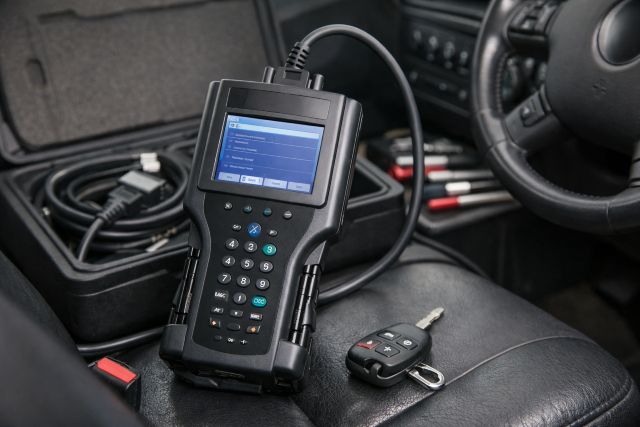

If you’re shopping for a GM Tech 2 Scanner, you’re probably trying to answer one question: is this “classic dealership tool” still a smart buy in 2026, or should you put that money into newer GM workflows like MDI2 plus GDS2 and Techline Connect? The honest answer is that the GM Tech 2 Scanner can still be absolutely worth it, but only when it matches the kind of GM vehicles you actually work on. On the right model years, it still feels faster and deeper than many modern tablet scanners. On newer vehicles, it’s no longer the center of GM’s diagnostic universe.
This guide breaks down what the GM Tech 2 Scanner still does extremely well, where it falls behind, and who should buy it today.
What is the GM Tech 2 Scanner?
The GM Tech 2 Scanner is an OEM-style diagnostic platform that became the standard in many GM dealership service departments for years. Its reputation comes from what it can do beyond reading codes. It provides deep access to GM modules, supports special functions, and allows bi-directional controls that let you command components and run system tests in ways many generic scan tools still struggle to match.
A major part of keeping a Tech 2 relevant is the CANdi module. OTC’s Tech 2 CANdi User’s Guide describes CANdi as an in-cable module that works with existing Tech 2 components and is backward compatible, essentially expanding what the setup can communicate with while keeping older functionality intact.
GM Tech 2 Scanner vehicle coverage: what years does it really make sense for?
This is where buyers either feel like they got a bargain or feel like they bought the wrong tool.
GM’s own diagnostic support materials make the split clear. ACDelco’s Diagnostic Support and Resources page explains that model year 2010 and newer GM vehicles require GDS2 running on a computer with MDI2 connected to the vehicle, and that earlier vehicles vary between Tech2Win and GDS2.
ACDelco also publishes a “GDS2 scan tool-supported vehicles” sheet that states all 2007 and prior model years have no GDS2 support and are supported by Tech2/Tech2Win, while all 2014 and future model years are supported by GDS2. The sheet also outlines that 2008–2013 are transitional, with many vehicles still supported by Tech2/Tech2Win while some are GDS2-supported, and it even calls out exceptions like certain Captiva Sport years.
A practical way to think about it is that the GM Tech 2 Scanner is strongest where Tech2/Tech2Win is the intended GM workflow. Once you’re primarily in the GDS2 era, Tech 2 becomes less of a main tool and more of a niche tool.
GM Tech 2 Scanner: is it worth buying today?
It is worth buying today if you frequently work on GM vehicles where Tech2/Tech2Win is the intended diagnostic path, especially 2007 and older, and many vehicles in the transitional 2008–2013 range depending on the model. That’s straight from GM’s own GDS2-supported vehicle guidance, which explicitly positions Tech2/Tech2Win for 2007 and older and indicates broad GDS2 support from 2014 onward.
It is much less worth buying today if you expect it to be your primary tool for 2014+ GM vehicles, because GM’s published resources point you toward GDS2 with MDI2 for those years.
The key is not whether the Tech 2 can “connect” in some situations. The key is whether the Tech 2 is aligned with the workflow GM expects for that vehicle generation, including software and support.
Pros of the GM Tech 2 Scanner
OEM-style depth on the right vehicles
When the Tech 2 matches the platform, it can feel like you’re navigating the vehicle the way the engineers intended. The menus are system-specific, and the tool tends to surface relearns, setup procedures, and special tests in a direct way.
If you’re diagnosing older GM systems, that OEM structure can cut your diagnostic time because you’re not fighting generic menu trees or missing module coverage.
Special functions and bi-directional controls that solve real jobs
Many “code readers” can tell you what’s wrong. Fewer tools can help you prove it quickly by commanding components, running routines, and verifying results. That’s where the GM Tech 2 Scanner built its reputation.
The most practical value is when you need functional tests and routines that mimic factory procedures, such as calibration tasks or automated tests, depending on the vehicle and system. This is also why many technicians still want the Tech 2 experience in Tech2Win form for supported vehicles.
CANdi module keeps the Tech 2 relevant in a wider range
If you’re buying a Tech 2 today, you should understand CANdi before you spend money.
OTC’s Tech 2 CANdi User’s Guide explains that CANdi is designed to work with existing Tech 2 components, is fully backward compatible, and is meant to be transparent unless a CANdi-specific feature is enabled. In real terms, CANdi is what makes many Tech 2 setups usable across a broader set of networked GM vehicles in the Tech 2 era.
Cons of the GM Tech 2 Scanner
It is not GM’s main path for newer diagnostics
GM’s own guidance makes it clear that modern diagnostics for 2010+ increasingly live in GDS2 on a computer with MDI2 connected to the vehicle, and that 2014+ is fully in the GDS2-supported world.
If you’re a shop that mostly sees newer GM vehicles, a Tech 2 purchase can feel like buying a specialty wrench when you really needed a full toolbox.
Programming expectations are where many buyers get disappointed
A lot of people buy a GM Tech 2 Scanner expecting it to handle programming like “plug in and flash a module.” Modern GM programming and service functions depend on the broader software ecosystem, subscriptions, and a stable pass-thru workflow.
ACDelco TDS is a key hub for GM diagnostic software subscriptions, listing options like GDS2 plus Tech2Win and Tech2Win standalone subscriptions with pricing and terms shown directly on the site.
That matters because it reflects where GM’s diagnostic world has gone. Even if the Tech 2 is excellent at diagnostics, programming and late-model support tend to pull you toward the computer-based toolchain.
The market is crowded with clones and inconsistent quality
One of the biggest risks today isn’t whether the Tech 2 concept works, it’s whether the unit you’re buying is reliable and supported. Many online listings are not genuine OEM units, and quality can vary. This becomes especially important if you’re depending on the tool daily.
Even when a clone “works,” long-term durability, connector quality, and firmware/software legitimacy become practical risks you should price in.
GM Tech 2 Scanner vs Tech2Win vs MDI2 + GDS2: how to choose
The cleanest way to choose is to match the tool to the GM generation you service most.
If your work is heavily 2007 and older GM, the GM Tech 2 Scanner or Tech2Win-style workflow is strongly aligned with GM’s published support guidance for those years.
If your work is heavily 2014 and newer GM, GM’s own documentation points you toward GDS2 support, typically paired with MDI2.
If your shop sees a true mix, many technicians end up with a two-lane setup: Tech 2 for legacy speed and familiar OEM workflows, and MDI2 plus GDS2 for modern coverage. That combination reduces friction because you’re not trying to force one tool to do everything across two very different diagnostic eras.
Buying tips for the GM Tech 2 Scanner in 2026
Decide whether you are buying for coverage or for speed on a specific era
A Tech 2 purchase makes the most sense when you want the best experience on vehicles it was designed for. If your goal is “one device for every GM from 1999 to 2026,” you will probably end up disappointed, because GM itself draws a line between Tech2/Tech2Win-era workflows and GDS2-era workflows.
Treat CANdi as part of the package, not an optional accessory
If you’re serious about using the GM Tech 2 Scanner across the networked vehicles in its era, CANdi is often what turns the tool from “sometimes useful” into “consistently useful.”
OTC’s guide emphasizes CANdi’s integration with existing Tech 2 components and backward compatibility, which is exactly why it is so commonly recommended as part of a complete setup.
Budget for the software ecosystem if you expect modern workflows
If you expect to do modern diagnostics and programming, build your budget around software subscriptions and supported toolchains, not just hardware.
ACDelco TDS lists subscription offerings for GDS2 and Tech2Win, which gives you a realistic picture of ongoing costs if you want to stay inside the official GM ecosystem.
FAQ
Is the GM Tech 2 Scanner still useful in 2026?
Yes, it can be very useful when you’re working in the Tech2/Tech2Win-supported years, especially 2007 and older and many vehicles in the 2008–2013 transition range depending on model. GM’s own supported-vehicles sheet and diagnostic resources show this split and position GDS2 for 2014+ vehicles.
Do I need the CANdi module with a GM Tech 2 Scanner?
If you plan to diagnose CAN-equipped GM vehicles in the Tech 2 era, CANdi is often essential. OTC’s Tech 2 CANdi User’s Guide explains that CANdi is an in-cable module designed to work with existing Tech 2 components and remain backward compatible, which is why it’s widely treated as part of a complete setup.
What should I buy instead if I mainly work on newer GM vehicles?
If your work is mostly 2014+ GM, GM’s guidance points to GDS2-supported diagnostics, typically using MDI2 connected to the vehicle while GDS2 runs on a computer.
Can I get the Tech 2 experience without buying the handheld unit?
Tech2Win is designed to emulate the Tech 2 on a PC, and ACDelco TDS sells Tech2Win subscriptions as well as bundles that include GDS2 plus Tech2Win.
Conclusion: GM Tech 2 Scanner — worth it or not?
The GM Tech 2 Scanner is still worth buying today when you’re servicing the GM years and models where Tech2/Tech2Win is the intended diagnostic approach, especially 2007 and older and many vehicles in the transition years depending on platform. GM’s own GDS2-supported vehicle guidance reinforces that Tech2/Tech2Win remains the support path for 2007 and prior, while GDS2 is the supported path for 2014 and future vehicles.
If you mainly service newer GM vehicles, the Tech 2 should not be your main investment. The more future-proof route is aligning with GM’s modern workflow, which GM’s own diagnostic resources position around GDS2 running on a computer with MDI2 connected to the vehicle.














Leave a comment