
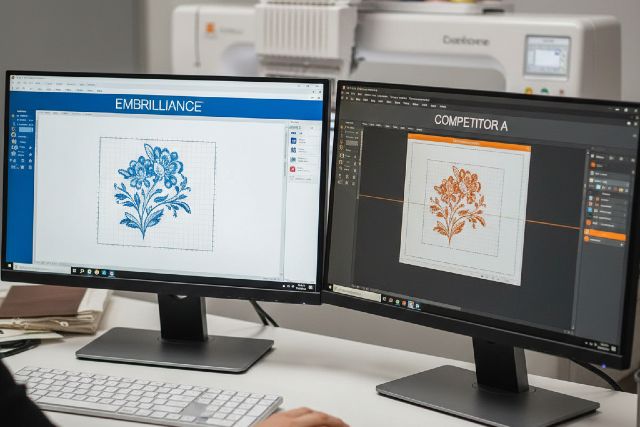

If you’ve been shopping for embrilliance software, you’ve probably noticed something: embroidery programs don’t just differ in features — they differ in how they want you to work. Some tools are modular and beginner-friendly, some are “all-in-one” pro suites, and some are affordable but limited once you outgrow auto-digitizing.
This guide compares Embrilliance to its biggest competitors (like Hatch, Embird, Brother PE-DESIGN, BERNINA software, mySewnet, and Ink/Stitch) with a practical goal: helping you pick the best software for your projects, skill level, and budget — without paying for tools you won’t use.
What Is Embrilliance Software (and why people choose it)
Embrilliance software is a modular embroidery platform designed to run on both Mac and Windows and scale with your needs — meaning you can start with basics (like organizing, editing, lettering) and add power later (like digitizing) without switching programs. Embrilliance positions itself as “fun, easy, and affordable” for hobbyists and pros, and it emphasizes native Mac/Windows support.
One standout difference is licensing. Embrilliance states your license can be used on as many computers as you personally own, and you can mix Mac and Windows. That matters if you have (for example) a Windows desktop in your studio and a MacBook you travel with, or if you want to install it on a second machine without paying again.
Embrilliance vs competitors: the real deciding factors
Most embroidery software marketing pages highlight tools (“auto-digitize!”, “create monograms!”, “advanced lettering!”). But in real use, your happiness usually comes down to four things:
Workflow fit (editing vs digitizing vs production)
If you mostly resize, merge, personalize, and stitch, editing workflow matters most.
If you create designs from scratch, digitizing workflow matters most.
If you sell items, you’ll care about efficiency tools like color sorting, production notes, and repeatable templates.
Learning curve
Some packages reward patience but feel heavy early on; others are friendlier but may cap your growth.
Licensing + cost structure
A perpetual license feels very different from a subscription, and modular add-ons feel different from a single “big purchase.”
Compatibility and file handling
Embroidery file workflows are messy: machines use different formats, and resizing isn’t always “free.” Strong software helps you avoid stitch distortion and production surprises.
Embrilliance software vs Hatch: the most common comparison
If you’re comparing Embrilliance with “the other big name,” it’s usually Hatch (by Wilcom). Hatch is commonly promoted as professional-quality results with a hobbyist-friendly experience, and it offers a 30-day free trial.
When Embrilliance is better than Hatch
You want a modular platform and a simpler upgrade path.
Embrilliance is built as one platform where adding products expands features without forcing you into a totally different program. StitchArtist explicitly describes itself as part of the Embrilliance platform that grows as you add titles.
You care about flexible licensing across your computers.
Embrilliance’s licensing policy is unusually generous compared to many creative programs: install on as many computers as you own, including Mac and Windows.
You’re primarily editing and personalizing (not full-time digitizing).
For many hobbyists, the day-to-day work is: import a design, resize for hoop, tweak stitch density, add a name, and stitch. Embrilliance can be a very “get in, get out” toolset for that workflow (especially once you’re comfortable with its interface).
When Hatch is better than Embrilliance
You want structured product tiers with clear “levels.”
Hatch lays out plans like Organizer → Customizer → Composer → Digitizer (and it positions Digitizer as the complete experience). If you like knowing “I’m buying the full suite,” Hatch makes that straightforward.
You like learning with built-in training + community momentum.
Hatch emphasizes video tutorials, training, and a large user community, including a Facebook user group.
You’re planning serious digitizing growth.
Wilcom’s ecosystem is deeply rooted in professional digitizing, and Hatch is often positioned as a friendlier bridge into that world.
Practical takeaway:
Choose Embrilliance if you want modular ownership, flexible licensing, and a workflow that stays lightweight as you build features.
Choose Hatch if you want a tiered “ladder” into digitizing, a trial-first approach, and training/community as a big part of the value.
Embrilliance vs Embird: modular vs modular, but with different vibes
Embird is another classic modular option (Windows-focused) where the base program can be extended with paid plug-ins, and plug-ins are registered separately.
Where Embrilliance tends to win
Mac support and cross-platform workflow is a major reason Embrilliance gets picked. Embrilliance is explicitly positioned as native on Mac and Windows.
Simpler “single platform” feel.
Embrilliance’s messaging emphasizes adding titles that “work together seamlessly” in one interface.
Where Embird can be a better choice
You like plug-in ecosystems and a Windows-first toolchain.
Some users prefer Embird’s approach of picking specific tools and growing slowly over time. And because it’s been around a long time, there’s a lot of community know-how.
Practical takeaway:
If you’re Mac-based (or mixed Mac/Windows), Embrilliance is often the cleaner fit. If you’re Windows-only and want a very plug-in-driven setup, Embird stays competitive.
Embrilliance vs Brother PE-DESIGN: open ecosystem vs brand ecosystem
Brother PE-DESIGN 11 is positioned as “personal embroidery & sewing digitization software” with time-saving features, aimed at hobbyists and home-business users.
When Embrilliance is better
You use multiple machine brands or you want brand-agnostic flexibility.
Embrilliance is widely used across many formats and workflows, and it’s typically chosen by people who don’t want to be locked to a single brand ecosystem.
You want flexible licensing across computers.
Embrilliance’s “install on as many computers as you own” policy is a meaningful advantage in multi-device households.
When PE-DESIGN is better
You’re all-in on Brother and want tight integration.
If your entire embroidery setup is Brother-based, PE-DESIGN can feel “native” to that world — especially for users who prefer staying inside a single manufacturer’s toolchain.
Embrilliance vs BERNINA software: approachable platform vs premium suite
BERNINA’s Embroidery Software 9 Creator is marketed as an entry point for embroidery software, including lettering/monogramming fonts and WiFi functionality, and it offers a free trial.
When Embrilliance is the better buy
You don’t need an enterprise-grade suite.
Many advanced suites include features you may never touch unless you digitize daily or produce for sale at scale.
You want a “buy what you need” modular approach.
Embrilliance’s modular expansion often aligns well with hobby growth: start with essentials, then add digitizing only if you truly need it.
When BERNINA software is better
You want a premium ecosystem with advanced capability and brand alignment.
If you’re deep into BERNINA machines and value the integrated experience, their software can be a logical match.
Embrilliance vs mySewnet: ownership vs subscription mindset
mySewnet promotes an embroidery software lineup where the Platinum level emphasizes “ultimate control” and digitizing options.
The big difference is often how you want to pay and how you think about upgrades:
If you prefer subscription access and a cloud-connected ecosystem, mySewnet can make sense.
If you prefer perpetual ownership and modular add-ons, Embrilliance usually feels more “own what you buy.” (Always verify the current license terms for any product before purchasing.)
Embrilliance vs Ink/Stitch: paid simplicity vs free power
Ink/Stitch is an open-source, cross-platform embroidery design and digitizing platform built as an Inkscape extension. It explicitly aims to be approachable for hobbyists while still powerful for professional digitizers.
When Embrilliance is better
You want a supported commercial product and a smoother on-ramp.
Open-source tools can be excellent, but the experience depends more on your comfort troubleshooting, learning community documentation, and adapting to updates.
When Ink/Stitch is better
Your budget is tight and you’re willing to learn.
If you can invest time instead of money, Ink/Stitch can be surprisingly capable — especially for users already familiar with vector workflows in Inkscape.
“Better” depends on your use case: quick scenarios
Scenario 1: The personalization-first hobbyist
You buy designs, adjust sizing, add names, and stitch gifts. You rarely digitize from scratch.
Best fit: Often Embrilliance (for modular editing, Mac/Windows flexibility, and licensing), or Hatch Organizer/Customizer if you prefer Hatch’s structured tiers.
Scenario 2: The “I want to digitize my own designs” creator
You want to turn art into stitches, control underlay, and refine stitch paths.
Best fit: Hatch Composer/Digitizer or Embrilliance StitchArtist (depending on which workflow you find more intuitive). StitchArtist is explicitly built as a digitizing tool inside the Embrilliance platform.
Scenario 3: The home-based embroidery business
You care about repeatability, speed, less thread changes, and clean production outputs.
Best fit: Often Hatch for structured production growth and training/community, or premium suites (BERNINA, brand tools) if you’re already in that ecosystem.
Actionable tips to choose the right embroidery software (without regret)
Tip 1: Decide whether you’re buying “editing” or “digitizing”
A lot of disappointment comes from buying digitizing software when you mainly needed editing (or vice versa). Editing makes existing designs more usable; digitizing creates designs from scratch.
Tip 2: Use the trial window strategically
If you’re considering Hatch, take advantage of the 30-day free trial and test your real projects (not just the sample files).
Tip 3: Score your must-haves before you shop
Your “must-haves” might be:
Runs on Mac
Works across multiple computers
Strong lettering tools
Digitizing control (underlay, pathing, stitch types)
File format compatibility for your machine
Then pick the tool that hits your top 3 must-haves, not the one with the longest feature list.
Tip 4: Don’t ignore the market reality: this category is growing
Embroidery machines (and their ecosystems) continue to expand globally, which is one reason software options keep evolving. Market research firms project growth in the embroidery machine market over the coming years (though estimates vary by source).
That growth usually means more software updates, more subscription models, and more brand ecosystems — so choosing based on workflow and licensing matters more than ever.
FAQs
Is Embrilliance software good for beginners?
Yes — especially if you start with editing/personalization workflows and add advanced modules later. Embrilliance is designed to be approachable while still expandable through its modular platform.
Can I install Embrilliance on more than one computer?
Yes. Embrilliance states you can install it on as many computers as you personally own, and you can mix Mac and Windows on one license.
Is Hatch better than Embrilliance?
It depends. Hatch can be better if you want a tiered product ladder and a trial-first experience with strong training/community. Embrilliance can be better if you want modular ownership and flexible licensing across your computers.
What’s the best free alternative to Embrilliance?
Ink/Stitch is a leading free, open-source option built on Inkscape, aiming to be a full-featured embroidery digitizing platform.
Which software is best for digitizing from scratch?
For many users, Hatch (Composer/Digitizer) and Embrilliance StitchArtist are common choices. StitchArtist is explicitly positioned as the digitizing tool within the Embrilliance platform.
Conclusion: So, what’s better — and why?
If you’re choosing between embrilliance software and competitors, the “best” option is the one that matches your workflow today and still supports how you’ll grow tomorrow.
Pick Embrilliance if you value a modular platform that expands without forcing you into a new program, want native Mac/Windows flexibility, and appreciate licensing that supports multiple personal computers.
Pick Hatch if you want a structured tier system, a strong trial-first buying path, and a learning ecosystem that supports deeper digitizing growth.
And if your priority is budget above all, Ink/Stitch can be a powerful free route — especially if you’re comfortable learning Inkscape-based workflows.











Leave a comment