
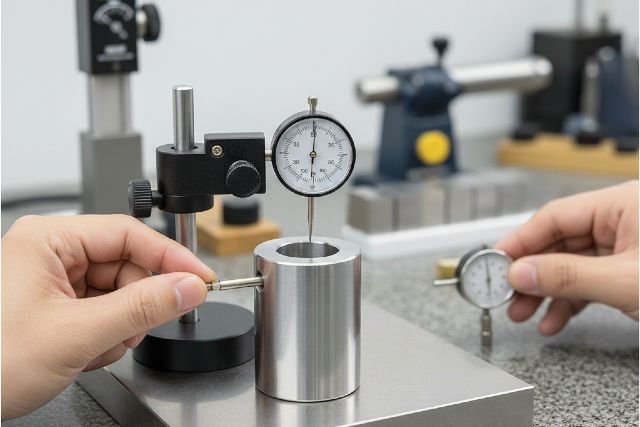

A dial test indicator is one of those tools that looks simple until you need readings you can repeat with confidence. Whether you’re tramming a mill head, dialing in a part in a 4-jaw, or checking runout on a shaft, the dial test indicator excels at showing tiny variations from a reference. The catch is that small setup mistakes, especially contact angle and mounting rigidity, can create misleading readings that waste time and ruin accuracy.
This article explains what a dial test indicator does best, how to set it up so it reads truthfully, and the accuracy hacks machinists and inspectors use to keep results consistent. You’ll also get clear answers to common questions, practical scenarios, and credible references so you can measure faster and with fewer surprises.
What Is a Dial Test Indicator?
A dial test indicator is a precision comparator that measures very small deviations from a reference using a pivoting lever stylus and a dial face. Because the contact point moves through an arc rather than straight in and out, the geometry of how you touch the work matters more than most people expect. In most real tasks, you’re not using a dial test indicator to measure an absolute size. You’re using it to find variation, such as runout, alignment error, surface change, or drift across a face.
This is why dial test indicators show up everywhere in setup work. They reveal what’s changing as you rotate a part, sweep a surface, or traverse along a jaw. That makes them ideal for machine alignment and inspection tasks where “difference from reference” matters more than “exact dimension.”
Dial Test Indicator vs Dial Indicator: Why the Difference Matters
A plunger-style dial indicator moves linearly along its axis. It’s often easier to interpret because you can align the plunger directly with the motion you care about. A dial test indicator uses a lever, which improves access and sensitivity for sweeping, but it also introduces more geometry sensitivity. If you set a DTI at a poor angle, you can create cosine error that makes the reading smaller than the actual deviation. Mitutoyo’s guidance on the cosine effect for indicators explains how misalignment between measurement direction and actual motion leads to inaccurate results.
In practice, choose a dial test indicator when you need side contact, sweeping motion, and access around features. Choose a plunger indicator when you can measure in-line, especially if your setup makes it hard to control angles.
Best Uses for a Dial Test Indicator
Tramming a Milling Machine Head
Tramming is a classic dial test indicator task. You mount the indicator in the spindle and sweep a circle on the table or a reference surface to see if the head is tilted. The DTI excels here because you can sweep smoothly and see tiny differences across the arc. The accuracy comes from keeping stylus contact consistent and preventing the stylus angle from changing too much as you sweep.
If your readings are inconsistent or seem to change depending on where you start, it’s usually not the machine. It’s the indicator angle, preload, or mounting rigidity.
Aligning a Vise or Fixture
When you sweep along a vise’s fixed jaw, you’re looking for deviation along X travel. A dial test indicator makes this fast because you can traverse and watch the dial drift. The key is to move smoothly and keep the stylus contact angle steady so you don’t introduce geometry-based error.
Indicating a Part in a 4-Jaw Chuck
Dialing in a part in a 4-jaw is where DTIs feel like magic. You rotate the chuck and watch deviation at a reference point. The lever stylus makes it easier to touch awkward shapes and delicate surfaces. To get predictable results, always rotate and approach your “read point” in a consistent way, because direction changes can reveal play in the system.
Checking Runout on Shafts, Bores, and Toolholders
A dial test indicator is widely used to check runout because it’s sensitive to small changes. Whether it’s a shaft, a bore, a collet, a toolholder, or a spindle test bar, the DTI provides fast feedback. If runout numbers don’t repeat between setups, the most common causes are dirt on mating surfaces, seating issues, or a mounting arm that moves when you touch the part.
Checking Surface Variation, Flatness Drift, and High Spots
DTIs excel at “find the high spot” work. Sweep across a surface and the dial reveals variation quickly. This is also where cleanliness matters most, because a tiny chip or burr can be larger than the deviation you’re hunting.
Dial Test Indicator Setup Tricks That Improve Accuracy
Control Contact Angle to Reduce Cosine Error
Cosine error is one of the biggest reasons people distrust dial test indicator readings. If the indicator isn’t measuring in the direction you think it is, the reading becomes a scaled version of reality. Mitutoyo explains that misalignment between the measuring direction and the intended movement causes inaccurate readings, and that proper setup can reduce that effect.
A practical way to think about it is this. The more you measure at an angle, the more you risk reading less than the true deviation. Your goal is not a perfect theoretical alignment in every setup. Your goal is a consistent, reasonable stylus angle that stays stable throughout the sweep or rotation.
If you notice the reading changes when you re-angle the indicator without changing the part, that’s a strong sign your geometry is dominating the result.
Use Light, Consistent Preload
A dial test indicator needs some preload so the stylus maintains contact. Too little preload causes skipping and unstable readings. Too much preload creates friction and can flex thin parts or introduce a “sticky” feel. The most important habit is consistency. Use similar preload each time and always approach your measurement from the same direction.
Shorten the Stylus Whenever Possible
Long stylus extensions increase leverage. That makes the contact more sensitive to vibration, surface texture, and flex in your mounting arm. If you can reach the surface with a shorter stylus, you’ll usually gain stability and repeatability.
Lock Down the Entire Mounting Stack
A dial test indicator is only as stable as the base, arms, clamps, and joints holding it. A magnetic base that feels “solid” by hand can still move under light force at the contact point. After setting contact, gently tap the arm or apply a tiny pressure near the indicator and watch the dial. If the needle jumps and doesn’t return exactly, you have flex or slip in the stack.
This is often the hidden reason readings drift when you tighten vise bolts, adjust jaws, or bump the work.
Match the Motion to the Indicator’s Measuring Direction
With a DTI, the stylus pivots. That pivot geometry means the measuring direction is not always intuitive. If you sweep in a way that changes how the stylus loads, the reading can vary from setup to setup even if the part is the same. Keeping your sweep path and stylus orientation consistent is one of the fastest “accuracy upgrades” you can make.
Accuracy Hacks That Actually Work in the Shop
Focus on Repeatability, Not Just Resolution
Resolution tells you how fine the graduations are. Repeatability tells you whether your setup and technique produce the same result over repeated trials. Many dial test indicators are available in fine resolutions such as 0.0005 inch or 0.01 mm, but real-world performance depends heavily on setup quality. Industry references commonly note that test indicators have short measuring ranges and are used for small deviations rather than long travel.
If your DTI has a fine scale but your readings don’t repeat, the problem is rarely the dial face. It’s usually contact angle, mount rigidity, preload, cleanliness, or approach direction.
Do a Simple Return-to-Zero Sanity Check
You can catch many issues with a basic repeatability check. Mitutoyo describes repeatability checks using a stand and a gauge block, repeating displacements and comparing indication differences.
A simplified shop approach is to mount the indicator rigidly, touch a clean reference such as a gauge block, deflect the stylus to a consistent point, and return several times while approaching from the same direction. If the needle returns to different zeros, investigate your setup first before blaming the tool.
Always Approach the Reading From the Same Direction
Direction changes can reveal backlash or play in your mounting system and can also change how the stylus loads. When indicating runout or alignment, rotate and approach your reference point consistently. If you overshoot, back away and approach again the same way rather than “creeping back” from the other direction.
Clean Contact Surfaces Like a Metrologist
A tiny chip, oil film, or burr can easily exceed the deviation you’re trying to measure. This matters most when checking runout or aligning fixtures to tight tolerances. If your numbers are inconsistent, cleaning is one of the quickest fixes.
Respect Temperature and Handling
If you’re checking precision parts, temperature matters. Hand heat can warm small parts, and freshly machined parts may still be moving as they cool. Even if you’re only indicating variation, heat can shift thin components and fixtures. Let parts stabilize, avoid squeezing gauge references, and measure with consistent handling.
Common Mistakes That Make Dial Test Indicator Readings Unreliable
One common mistake is treating the dial test indicator as an absolute measurement device rather than a comparator. DTIs are best when you’re comparing variation around a reference. Another mistake is letting the stylus angle change during a sweep, which can introduce geometry-based differences that look like part error. Loose mounting joints and over-preload also cause drift and non-repeatable results.
If you suspect the indicator is at fault, verify repeatability against a known reference. If repeatability improves when you stiffen the mount or adjust the stylus angle, your setup was the issue.
Real-World Scenarios Where Technique Beats Gear
Tramming a Mill Head Without Chasing Ghost Readings
A clean tramming process starts with a rigid mount and a consistent stylus angle across the sweep. Sweep the same circle, read the difference, adjust, then re-sweep using the same preload and motion. If your readings change dramatically between sweeps without adjustment, look for mount slip or stylus angle shift rather than machine error.
Dialing in a 4-Jaw With Fewer Iterations
Choose a reference point, rotate smoothly, and always approach the measurement from the same direction. Make small opposing jaw adjustments and recheck. If the part seems to “move” when you tighten jaws, you’re learning something important about clamping distortion, not just concentricity.
Checking Spindle or Toolholder Runout With Confidence
Clean the taper, clean the toolholder, clean the test bar. Mount the indicator rigidly. Rotate by hand and watch for peak-to-peak variation. If runout changes each time you reseat the toolholder, it often indicates seating contamination or taper condition rather than the spindle being inherently bad.
FAQ: Dial Test Indicator Questions
What is a dial test indicator used for?
A dial test indicator is used to measure small deviations from a reference, most commonly runout, alignment, tramming, vise/fixture alignment, and surface variation checks.
How accurate is a dial test indicator?
Accuracy depends on the indicator’s build, resolution, and especially setup geometry. Cosine error and mounting rigidity can dominate results. Mitutoyo’s notes on the cosine effect explain why misalignment can make readings inaccurate and why controlling the setup angle matters.
Why does my dial test indicator not return to zero?
Common causes include a loose mounting stack, inconsistent approach direction, dirt on the contact point, too much preload, or internal sticking. A repeatability check using a stable reference such as a gauge block helps isolate whether the issue is setup or the indicator.
Can I use a dial test indicator for tramming?
Yes. It’s one of the most common uses because the lever stylus is convenient for sweeping surfaces. The key is consistent stylus angle and rigid mounting so cosine error and flex don’t corrupt the readings.
Conclusion
A dial test indicator is one of the fastest ways to see tiny deviations that matter in machining and inspection, but it rewards disciplined setup. When you control stylus angle to reduce cosine error, use consistent preload, keep the stylus short, and lock down the mounting stack, your readings become repeatable and trustworthy. Add simple verification habits like return-to-zero checks on a known reference, and your dial test indicator stops being a “touchy tool” and becomes a reliable extension of your process.
















Leave a comment